
Suno Song Generation API Integration Guide
As AI applications become more widespread, various AI programs have gradually become popular. AI has gradually penetrated every aspect of people's work and lives. The industries involving AI are also becoming increasingly diverse, from writing at the beginning, to medical care and education, and now to music.
Suno is a professional, high-quality AI song and music creation platform. Users only need to enter simple text prompts to generate songs with vocals based on genre styles and lyrics. This AI music generator was developed by team members from well-known technology companies such as Meta, TikTok, and Kensho, with the goal of allowing everyone to create wonderful music without requiring any musical instruments or tools.
The following is the progress of model updates:
| Version | model | Release Date | lyric Limit | style Limit | Maximum Song Duration |
|---|---|---|---|---|---|
| v6 | chirp-v6 | 2026.09.09 | — | — | — |
| v6 Wild | chirp-v6-wild | 2026.09.09 | — | — | — |
| v6 Mini | chirp-v6-mini | 2026.09.09 | — | — | — |
| v5.5 | chirp-v5-5 | 2026.03.27 | 5000 | 1000 | 8 minutes |
| v5 | chirp-v5 | 2025.09.23 | 5000 | 1000 | 8 minutes |
| v4.5+ | chirp-v4-5-plus | 2025.07.17 | 5000 | 1000 | 8 minutes |
| v4.5 | chirp-v4-5 | 2025.05.03 | 5000 | 1000 | 4 minutes |
| v4 | chirp-v4 | 2024.12.17 | 3000 | 200 | 150 seconds |
| v3.5 | chirp-v3-5 | --- | 3000 | 200 | 120 seconds |
The
lyricandstylelimits in the table above are the upper limits in custom mode (customistrue). The non-custom inspiration mode (customisfalse) only requires filling inprompt, with a maximum length of 500 characters (consistent across all models).
Suno now supports chirp-v6, chirp-v6-wild, and chirp-v6-mini. It is recommended to use chirp-v6; old model names remain compatible.
However, Suno officially does not provide an API. 艺舟AI provides a set of Suno APIs that simulate integration with the official Suno platform, allowing you to quickly and conveniently generate the music you want.
¶ Application and Usage
To use the Suno Audios Generation API, first go to the 艺舟AI Console to obtain your API Token and keep it for later use.
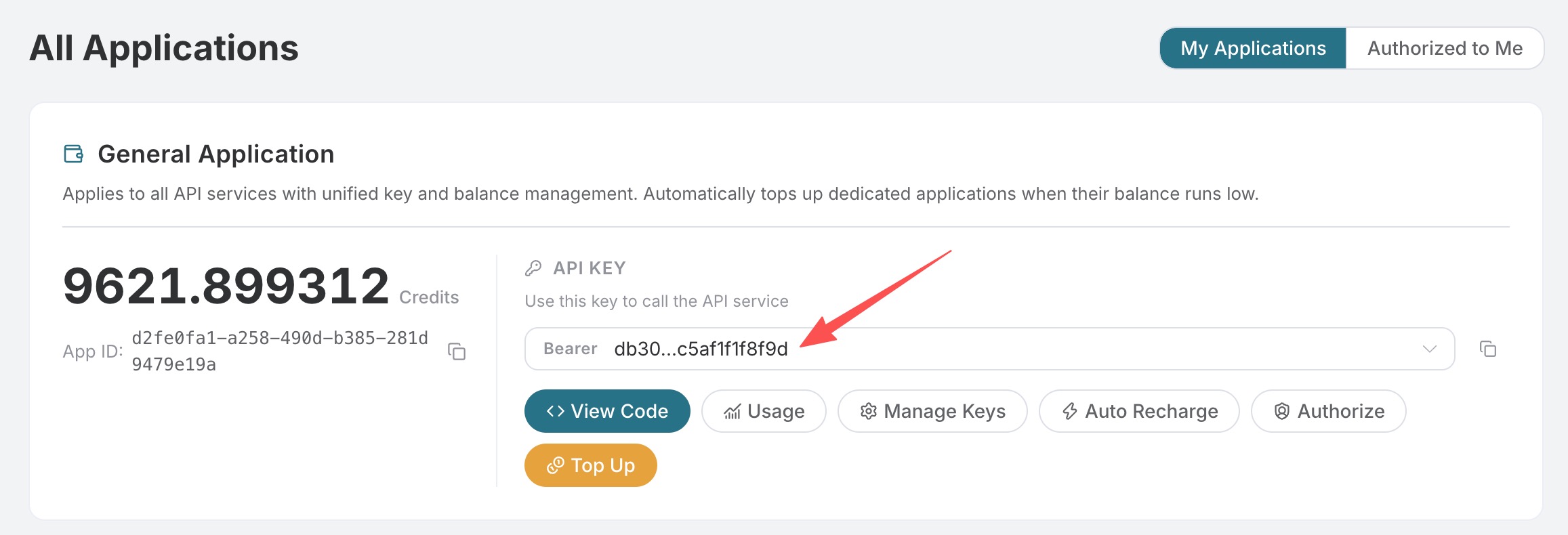
If you have not logged in or registered yet, you will be automatically redirected to the login page to register and log in, and you will automatically return to the current page after completion.
One API Token can call all platform services; there is no need to apply separately for each service. Your first application will include free credits for a free trial; when your credits are insufficient, you can top up your general balance in the Console.
📘 Full documentation: Suno Audios Generation API →
¶ Basic Usage
For whatever song you want, you can enter any piece of text. For example, if I want to generate a song about Christmas, I can enter a song for Christmas, as shown below:
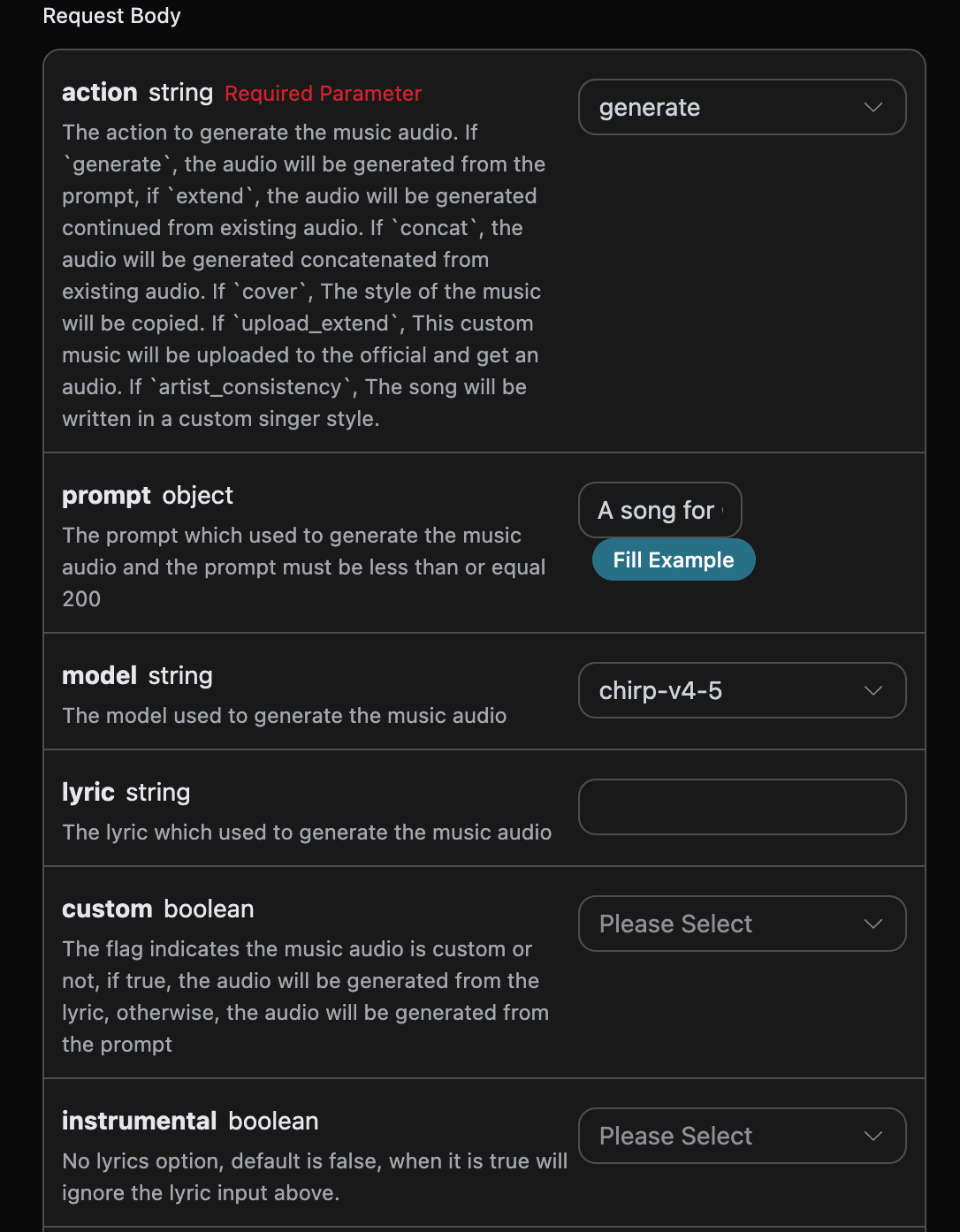
You can see that we set the Request Headers here, including:
accept: The format of the response result you want to receive. Here, it is set toapplication/json, which is JSON format.authorization: The key for calling the API. After applying, you can directly select it from the dropdown.
Additionally, the Request Body is set, including:
action: Audio task type, default isgenerate. Supports operations such as generation, extension, cover, mashup, stem separation, adding audio tracks, extracting specified audio tracks, generating sound effects, and adjusting speed, all uniformly called throughPOST /suno/audios.prompt: Suno official inspiration mode prompt (effective whencustomisfalse), maximum 500 characters.model: The model for this music generation task. The v6 series includeschirp-v6,chirp-v6-wild, andchirp-v6-mini; legacy model names remain compatible.max_mode: Enhanced generation mode.generateis enabled only when bothcustomandmax_modearetrue, costing 1.12 Credits;add_stemcan be enabled directly, costing 1.344 Credits. When disabled or omitted, they cost 0.56 and 0.672 Credits respectively.variety: Diversity strength of generation results, optional values areoff,normal,high,extra, andmax. Only used forgenerateandadd_stem; passing it for other actions returns 400.lyric: Lyrics content for Suno official custom mode. Maximum 3000 characters forchirp-v3-5andchirp-v4; maximum 5000 characters forchirp-v4-5and above (includingchirp-v5andchirp-v5-5).custom: Whether to use custom mode, default is:false.instrumental: The instrumental music option for Suno official inspiration mode.title: Music title for Suno official custom mode. Maximum 80 characters forchirp-v3-5andchirp-v4; maximum 100 characters forchirp-v4-5and above.style: Music style for Suno official custom mode. Maximum 200 characters forchirp-v3-5andchirp-v4; maximum 1000 characters forchirp-v4-5and above (includingchirp-v5andchirp-v5-5).negative_tags: Music styles or genres to exclude during custom generation, also usable forreplace_section. This API currently has no fixed character limit for this field; excessively long content may still be unprocessable, so it is recommended to keep descriptions concise.audio_weight: Influence weight of audio or vocal characteristics, range 0-1;0is also a valid value. It can be used for operations such as generation, extension, cover, adding audio tracks, and vocal consistency; when there is no reference audio or vocal characteristic, the model may weaken or ignore this value.audio_id: ID of the reference music, used for subsequent operations such as cover, extension, and stem separation. Audio files can still be downloaded, but this does not mean subsequent processing for that ID is always available; ifsuno_processing_unavailableis returned, please retain thetask_idandtrace_idand contact support.overpainting_start/overpainting_end: Start and end times for adding vocals to existing instrumental music, in seconds.underpainting_start/underpainting_end: Start and end times for adding accompaniment to a cappella vocals, in seconds.persona_id: Voice ID obtained through the Persona or voice creation API, not the song'saudio_id.continue_at: Extension boundary, in seconds. For example, 213.5 means generating the subsequent segment starting from 3 minutes 33.5 seconds.lyricandstyleonly guide new content after the boundary and will not replace lyrics or singing before the boundary in the source audio.style_influence: Style influence in custom mode, range 0-1; a higher value generally matches the selected style more closely;0is passed as a valid value.replace_section_end: Final time of the replacement segment.replace_section_start: Start time of the replacement segment.vocal_gender: Controls preference for female or male vocals,ffor female vocals andmfor male vocals; effective for models 4.5 and above; it is a preference and strict adherence is not guaranteed.weirdness: Weirdness level in custom mode, range 0-1; a higher value is generally more creative and experimental;0is passed as a valid value.duration: Expected song duration, in seconds; must be an integer, ranging from 10 to 360. Currently, onlygenerateuses this parameter, and the specific effect depends on the mode and model. It is a preference prompt rather than a hard constraint: the model will refer to it but does not guarantee reaching it, and the actual finished duration is subject to thedurationfield in the response, which is usually shorter than the expected value.
¶ Scope of Voice ID Usage
generate, cover, upload_cover, artist_consistency, and artist_consistency_vox can use persona_id. The latter two actions must provide persona_id; they can also simultaneously provide the audio_id of the song used when creating that Persona.
extend and upload_extend do not use an additional persona_id. Whether mashup and inspo support voice IDs depends on the selected service channel; other actions are not guaranteed to apply this field, so please use it according to the instructions for each operation. vocal_gender is an optional gender preference and cannot replace a voice ID.
Subsequent creation operations require a valid source audio_id; mashup requires at least two mashup_audio_ids. HTTP 400 will be returned when required sources or time parameters are missing.
¶ Scope of Advanced Parameters
| Parameter | Value | Supported actions | Description |
|---|---|---|---|
weirdness |
0-1 | Optional | Adjusts experimentalism; 0 is a valid value; effects depend on the action, mode, and model |
style_influence |
0-1 | Optional | Adjusts style-following tendency; 0 is a valid value; effects depend on the action, mode, and model |
audio_weight |
0-1 | Optional | Adjusts the influence of audio or sound characteristics; may be ignored by the model when no reference information is provided |
variety |
off / normal / high / extra / max |
generate, add_stem |
Adjusts style diversity among results |
max_mode |
boolean | generate (requires custom=true), add_stem |
Enhances consistency and is billed according to enhanced mode |
vocal_gender |
f / m |
Generation actions that support vocal control | Preference setting, strict adherence is not guaranteed |
duration |
Integer 10-360 | generate |
Expected duration; other actions do not currently use this field, actual length is subject to the result |
The platform validates parameter types and value ranges, but does not reject these optional adjustment items solely because the action differs; specific effects depend on the action, mode, and model.
lyric_prompt: The prompt for generating lyrics, which takes effect if and only ifcustomistrueandlyricis not provided.callback_url: The URL that needs callback results.async: Optional. When set totrue, the API immediately returnstask_id, with no need to providecallback_url; then use the corresponding task query API to poll for results.
The generated code is as follows:
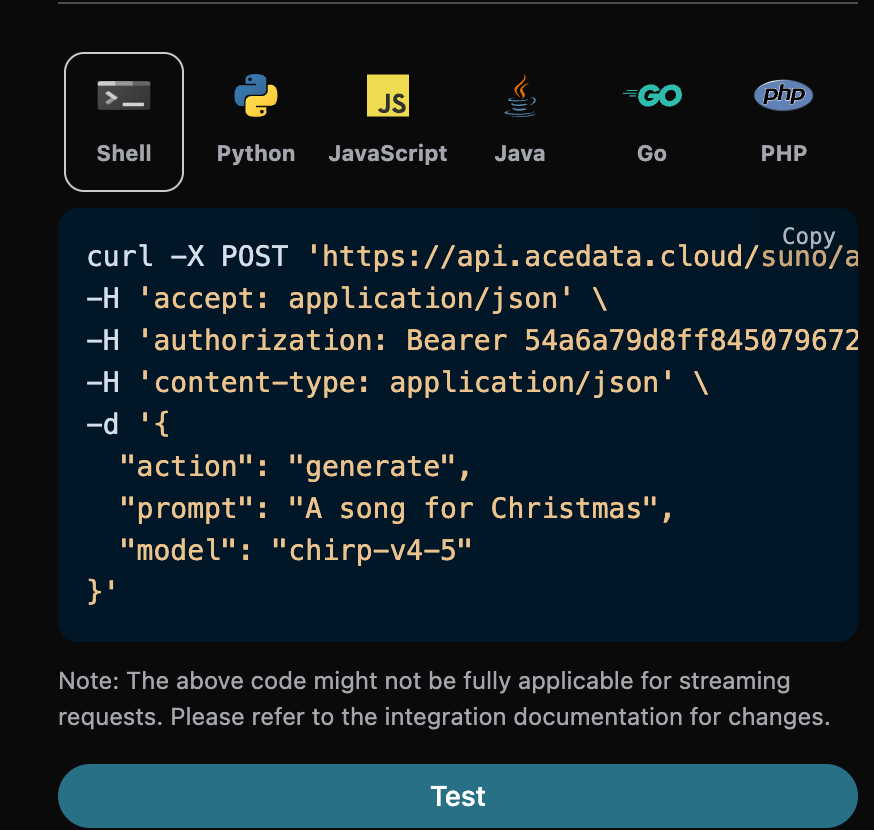
You can click the "Try" button to test the API directly. Wait 1-2 minutes, and the result is as follows:
{
  "success": true,
  "task_id": "e72fb249-bd5b-4e2a-b20c-8a06fea5ac14",
  "trace_id": "7dbc5b6a-b2c0-4d85-9d39-fa8a8a785ccf",
  "data": [
    {
      "id": "b481b17a-bf50-4e10-8adc-4d5635050893",
      "title": "Under the Mistletoe",
      "image_url": "https://cdn.acedata.cloud/e724d7f13d.png?example=image-001",
      "lyric": "[Verse]\nSnowflakes falling on the ground\nTwinkling lights all around\nThe scent of pine fills the air\nChristmas magic everywhere\n[Chorus]\nUnder the mistletoe tonight\nHearts aglow in the soft moonlight\nLaughter echoes\nSpirits bright\nIt’s Christmas time\nIt feels so right\n[Verse 2]\nStockings hung by the fire’s glow\nWarmth inside while the cold winds blow\nCookies baking\nSweet delight\nA season of joy shining bright\n[Chorus]\nUnder the mistletoe tonight\nHearts aglow in the soft moonlight\nLaughter echoes\nSpirits bright\nIt’s Christmas time\nIt feels so right\n[Bridge]\nCarols sung by candlelight\nStars above make the world feel tight\nPeace and love\nA season’s creed\nFilling hearts with all we need\n[Chorus]\nUnder the mistletoe tonight\nHearts aglow in the soft moonlight\nLaughter echoes\nSpirits bright\nIt’s Christmas time\nIt feels so right",
      "audio_url": "https://cdn.acedata.cloud/assets/examples/fish/5ade0339-5f11-487e-aacc-06a908271706-8e3fcb0e5547.mp3",
      "video_url": "",
      "created_at": "2025-06-17T15:59:32.468Z",
      "model": "chirp-auk",
      "state": "succeeded",
      "prompt": "A song for Christmas",
      "style": "holiday, cheerful, male vocals",
      "duration": 154.92
    },
    {
      "id": "fbf22dab-5e2b-4e02-84c0-6d7605f14c3d",
      "title": "Under the Mistletoe",
      "image_url": "https://cdn.acedata.cloud/e724d7f13d.png?example=image-002",
      "lyric": "[Verse]\nSnowflakes falling on the ground\nTwinkling lights all around\nThe scent of pine fills the air\nChristmas magic everywhere\n[Chorus]\nUnder the mistletoe tonight\nHearts aglow in the soft moonlight\nLaughter echoes\nSpirits bright\nIt’s Christmas time\nIt feels so right\n[Verse 2]\nStockings hung by the fire’s glow\nWarmth inside while the cold winds blow\nCookies baking\nSweet delight\nA season of joy shining bright\n[Chorus]\nUnder the mistletoe tonight\nHearts aglow in the soft moonlight\nLaughter echoes\nSpirits bright\nIt’s Christmas time\nIt feels so right\n[Bridge]\nCarols sung by candlelight\nStars above make the world feel tight\nPeace and love\nA season’s creed\nFilling hearts with all we need\n[Chorus]\nUnder the mistletoe tonight\nHearts aglow in the soft moonlight\nLaughter echoes\nSpirits bright\nIt’s Christmas time\nIt feels so right",
      "audio_url": "https://cdn.acedata.cloud/assets/examples/fish/5ade0339-5f11-487e-aacc-06a908271706-8e3fcb0e5547.mp3",
      "video_url": "",
      "created_at": "2025-06-17T15:59:32.468Z",
      "model": "chirp-auk",
      "state": "succeeded",
      "prompt": "A song for Christmas",
      "style": "holiday, cheerful, male vocals",
      "duration": 158.48
    }
  ]
}
As you can see, at this point we have obtained the content of two songs, including the title, preview image, lyrics, audio, video, and other content.
The field descriptions are as follows:
- success: Whether generation was successful. If successful, it is
true; otherwise, it isfalse. - data: A list containing detailed information about the generated songs.
- state: The song generation status, mainly including four types, specifically as follows:
- succeeded: Generation succeeded
- pending: In queue
- running: In progress
- error: Failed
- id: Song ID
- title: The title of the song
- image_url: The cover image of the song
- lyric: The lyrics of the song
- audio_url: The final audio URL of the song. The platform prioritizes returning an 艺舟AI CDN URL; if persistence fails, it may return the original media URL, so please download it promptly.
- video_url: The video file of the song; opening it displays an mp4 video.
- created_at: Creation time
- model: The model used, generally the latest v3 model
- style: Style
- state: The song generation status, mainly including four types, specifically as follows:
¶ Custom Generation
If you want to customize the generated lyrics, you can enter lyrics:
At this point, the lyric field can be passed content similar to the following:
[Verse]\nSnowflakes falling all around\nGlistening white\nCovering the ground\nChildren laughing\nFull of delight\nIn this winter wonderland tonight\nSanta's sleigh\nUp in the sky\nRudolph's nose shining bright\nOh my\nHear the jingle bells\nRinging so clear\nBringing joy and holiday cheer\n[Verse 2]\nRoasting chestnuts by the fire's glow\nChristmas lights\nThey twinkle and show\nFamilies gathering with love and cheer\nSpreading warmth to everyone near
Note that
\nin the lyrics here is a newline character. If you do not know how to generate lyrics, you can use the lyric generation API provided by 艺舟AI to generate lyrics through a prompt. The API is Suno Lyrics Generation API.
Next, we will generate a song based on the lyrics, title, and style. You can specify the following content:
- lyric: The lyric text
- custom: Set to
true, which represents custom generation. This parameter defaults to false, which represents generation usingprompt. - title: The title of the song.
- style: The style of the song, optional.
The filling example is as follows:
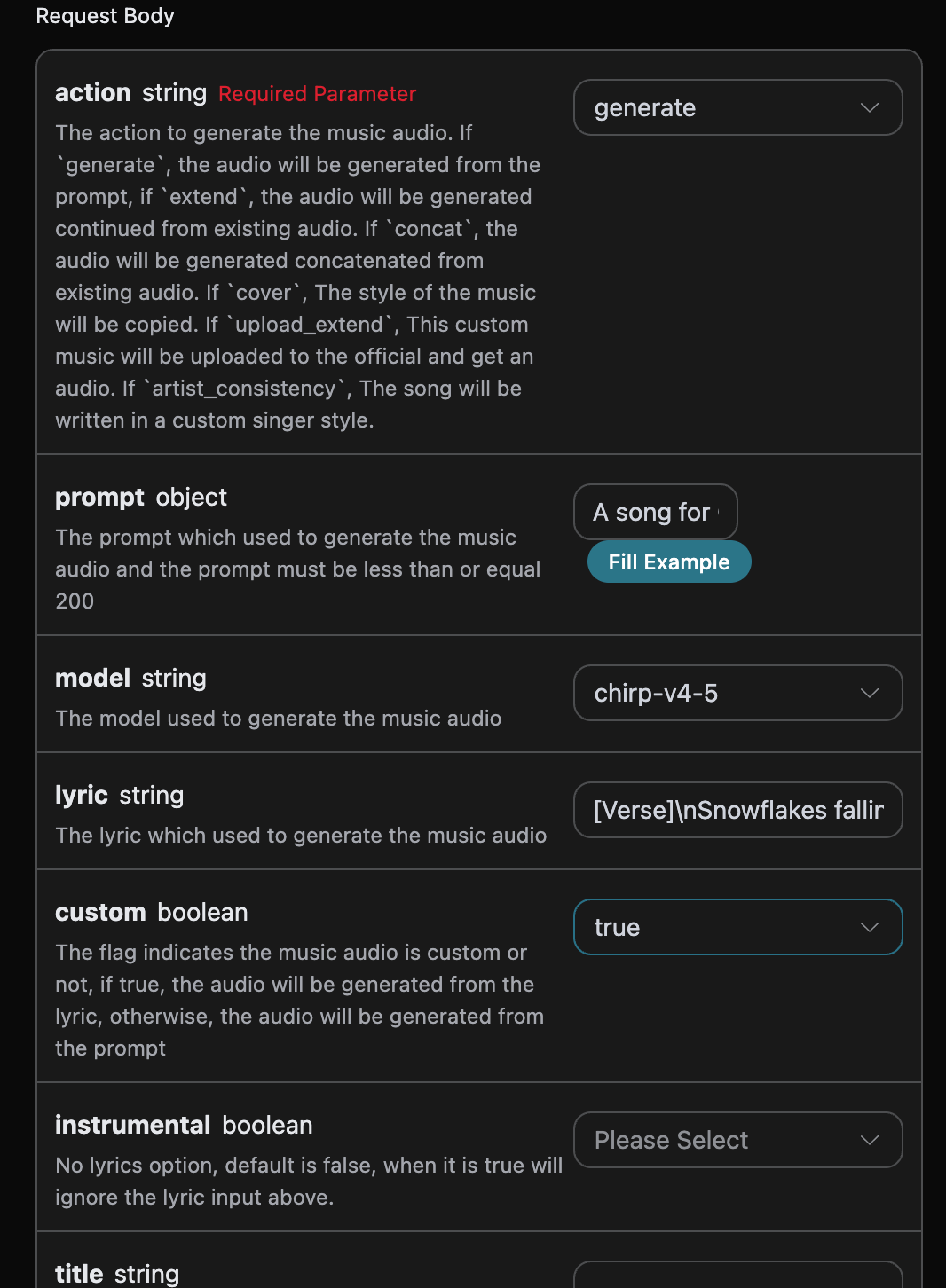
After filling it out, the following code is automatically generated:
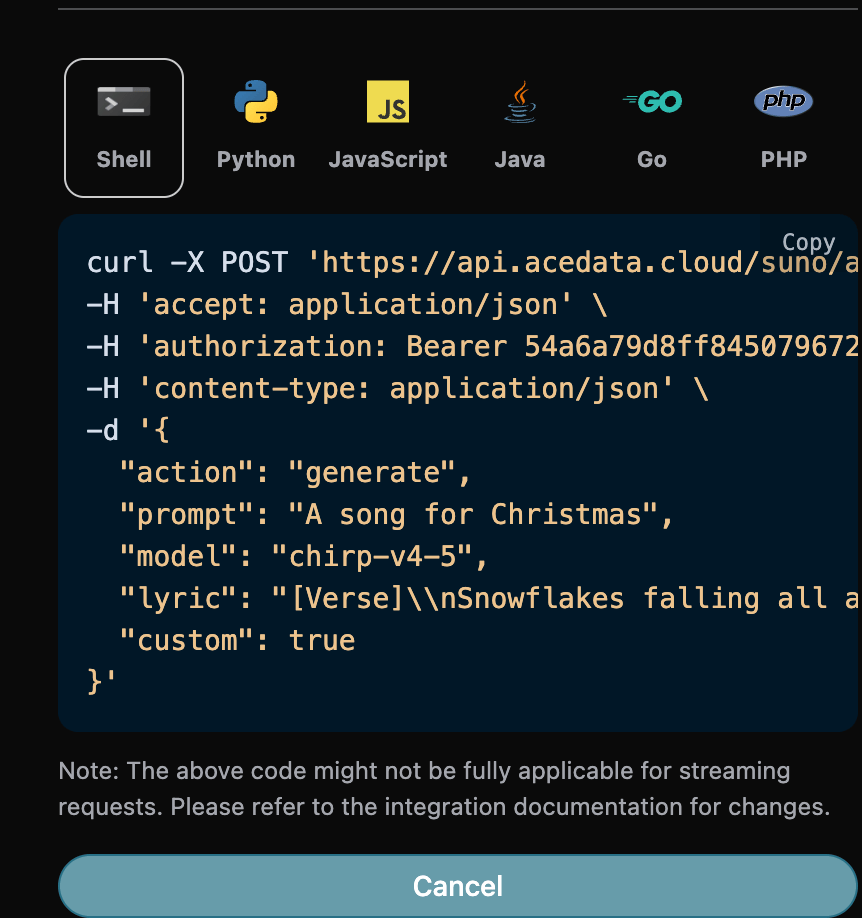
The corresponding code:
curl -X POST 'https://api.ezhou.art/suno/audios' \
-H 'accept: application/json' \
-H 'authorization: Bearer {token}' \
-H 'content-type: application/json' \
-d '{
  "action": "generate",
  "prompt": "A song for Christmas",
  "model": "chirp-v4-5",
  "lyric": "[Verse]\\nSnowflakes falling all around\\nGlistening white\\nCovering the ground\\nChildren laughing\\nFull of delight\\nIn this winter wonderland tonight\\nSanta's sleigh\\nUp in the sky\\nRudolph's nose shining bright\\nOh my\\nHear the jingle bells\\nRinging so clear\\nBringing joy and holiday cheer\\n[Verse 2]\\nRoasting chestnuts by the fire's glow\\nChristmas lights\\nThey twinkle and show\\nFamilies gathering with love and cheer\\nSpreading warmth to everyone near",
  "custom": true
}'
The test is allowed, and the generated result is similar.
¶ Custom Singer Style Generation Feature
If you want to use a singer style to generate a song, first generate a song through the basic usage above.
Finally, you need to set this song as a singer style, and then go to Suno Persona API to generate a singer style ID parameter persona_id based on the music ID audio_id generated by the official source. The specific parameters are shown in the image below:
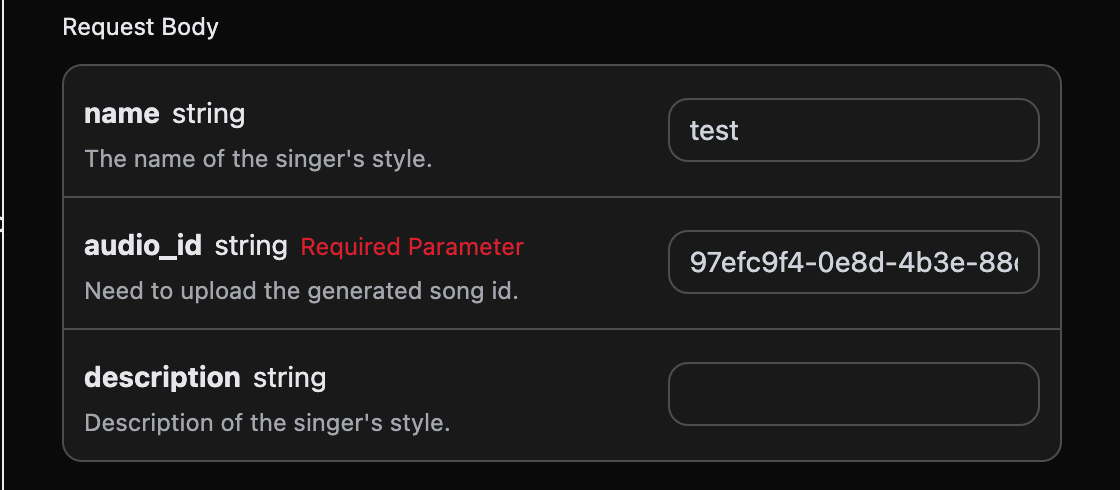
After filling it out, the following code is automatically generated:
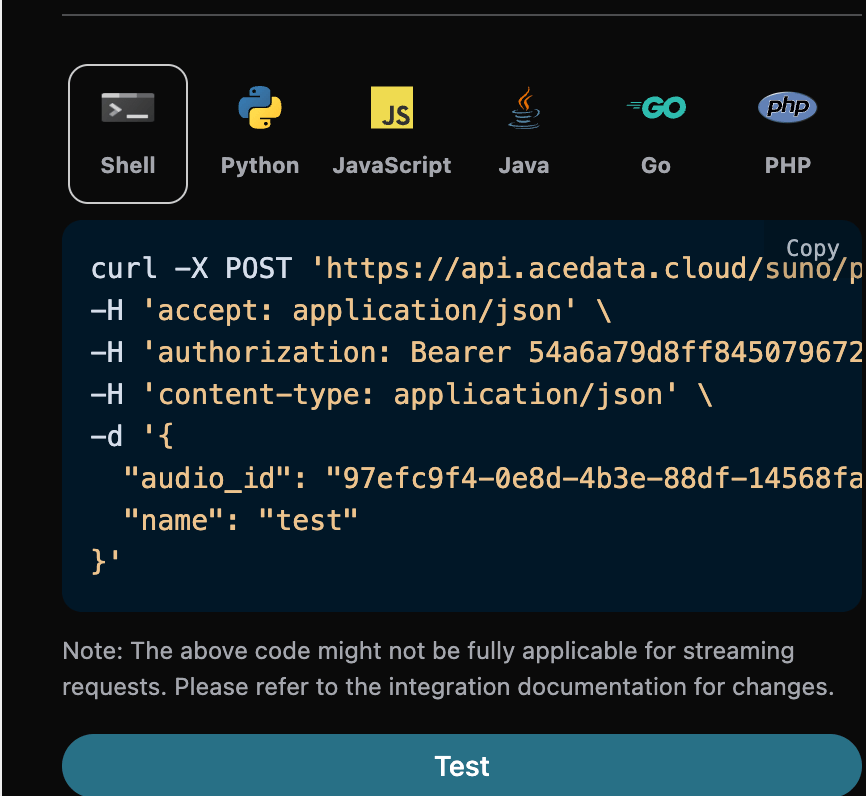
The corresponding Python code:
import requests

url = "https://api.ezhou.art/suno/persona"

headers = {
    "accept": "application/json",
    "authorization": "Bearer {token}",
    "content-type": "application/json"
}

payload = {
    "audio_id": "97efc9f4-0e8d-4b3e-88df-14568fa1b11f",
    "name": "test"
}

response = requests.post(url, json=payload, headers=headers)
print(response.text)
Click Run, and you can find that you will get a result as follows:
{
  "success": true,
  "task_id": "7628b754-4fe7-4e79-bda4-806d0dd8bf6e",
  "data": {
    "persona_id": "e0d7319e-aa2a-44cb-b00a-916218d7cb0b"
  }
}
We use the audio_id and persona_id above, 97efc9f4-0e8d-4b3e-88df-14568fa1b11f and e0d7319e-aa2a-44cb-b00a-916218d7cb0b respectively, as the example data this time. Then you can set the parameter action to artist_consistency (if it is the new singer style Persona-v2-vox, action must be set to artist_consistency_vox), and enter the ID of the song that needs to continue being generated and the singer style ID. The filling example is as follows:
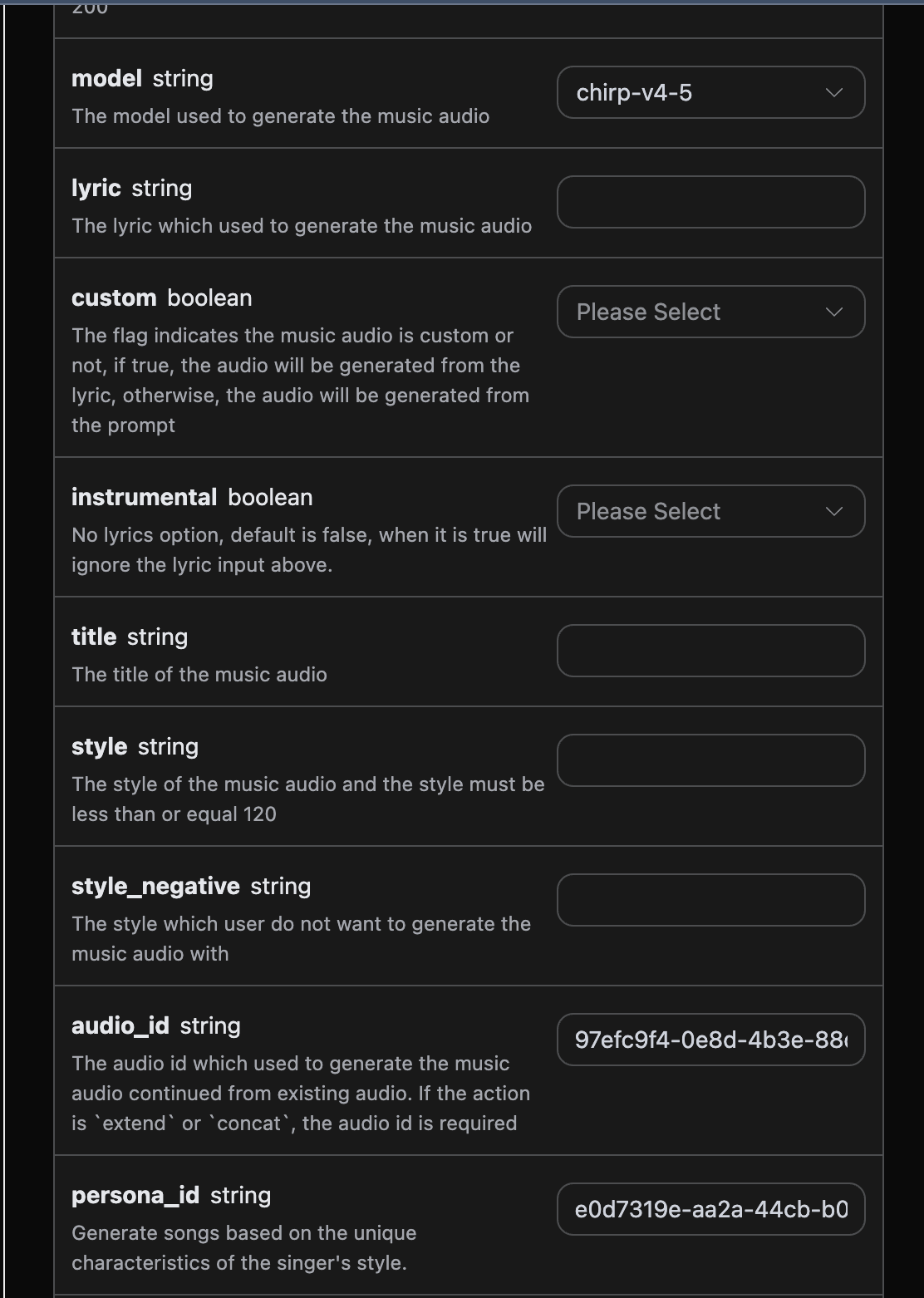
After filling it out, the following code is automatically generated:
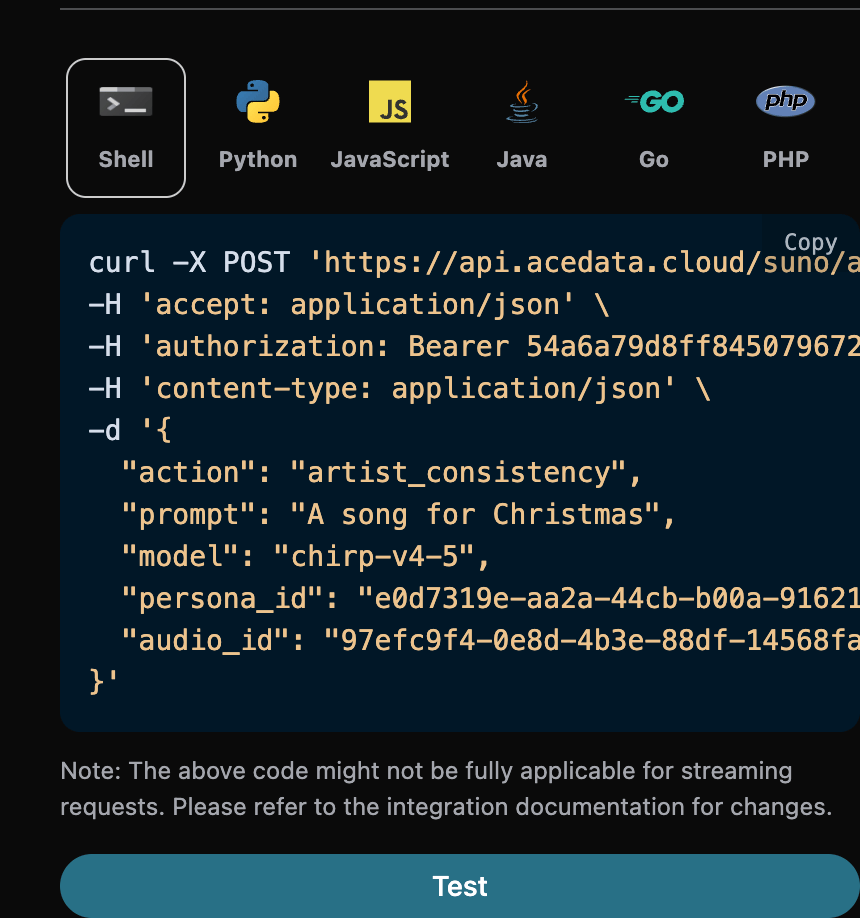
The corresponding Python code:
import requests

url = "https://api.ezhou.art/suno/audios"

headers = {
    "accept": "application/json",
    "authorization": "Bearer {token}",
    "content-type": "application/json"
}

payload = {
    "action": "artist_consistency",
    "prompt": "A song for Christmas",
    "model": "chirp-v4-5",
    "persona_id": "e0d7319e-aa2a-44cb-b00a-916218d7cb0b",
    "audio_id": "97efc9f4-0e8d-4b3e-88df-14568fa1b11f"
}

response = requests.post(url, json=payload, headers=headers)
print(response.text)
Click Run, and you can find that you will get a result as follows:
{
  "success": true,
  "task_id": "9b732b1a-bd67-48bc-95e4-90140e06836f",
  "trace_id": "30fcd88e-7687-4137-92d7-913b58115204",
  "data": [
    {
      "id": "727a36e2-8dce-4df7-99e5-14e44635c80f",
      "title": "",
      "image_url": "https://cdn.acedata.cloud/e724d7f13d.png?example=image-003",
      "lyric": "",
      "audio_url": "https://cdn.acedata.cloud/assets/examples/fish/5ade0339-5f11-487e-aacc-06a908271706-8e3fcb0e5547.mp3",
      "video_url": "",
      "created_at": "2025-06-17T16:27:33.979Z",
      "model": "chirp-auk",
      "state": "succeeded",
      "style": "",
      "duration": 244.4
    },
    {
      "id": "3b33301a-b17e-4b25-8842-09b46dab1a36",
      "title": "",
      "image_url": "https://cdn.acedata.cloud/e724d7f13d.png?example=image-004",
      "lyric": "",
      "audio_url": "https://cdn.acedata.cloud/assets/examples/fish/5ade0339-5f11-487e-aacc-06a908271706-8e3fcb0e5547.mp3",
      "video_url": "",
      "created_at": "2025-06-17T16:27:33.979Z",
      "model": "chirp-auk",
      "state": "succeeded",
      "style": "",
      "duration": 229.88
    }
  ]
}
It can be seen that the result content is consistent with the above, which achieves the function of generating songs using a singer style.
¶ Continue Generation Feature
If you want to continue generating an already generated Suno song, you can set the action parameter to extend and enter the ID of the song that needs to be continued. The song ID is obtained according to the basic usage. As can be seen above, at this point you can see that the song ID is:
"id": "97efc9f4-0e8d-4b3e-88df-14568fa1b11f"
Note that the
idin the lyrics here is the ID of the generated song. If you do not know how to generate a song, you can refer to the basic usage above to generate a song.
If you want to continue generating a song you uploaded yourself, you can set the action parameter to upload_extend and enter the ID of the custom uploaded song that needs to be continued. The song ID is obtained using the Suno Upload Generation API, as shown below:
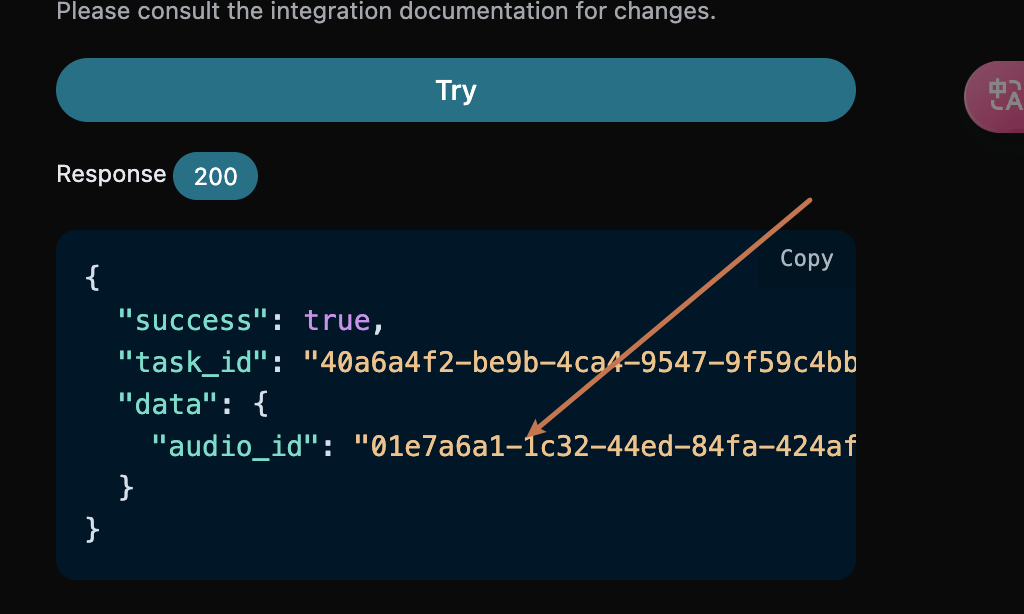
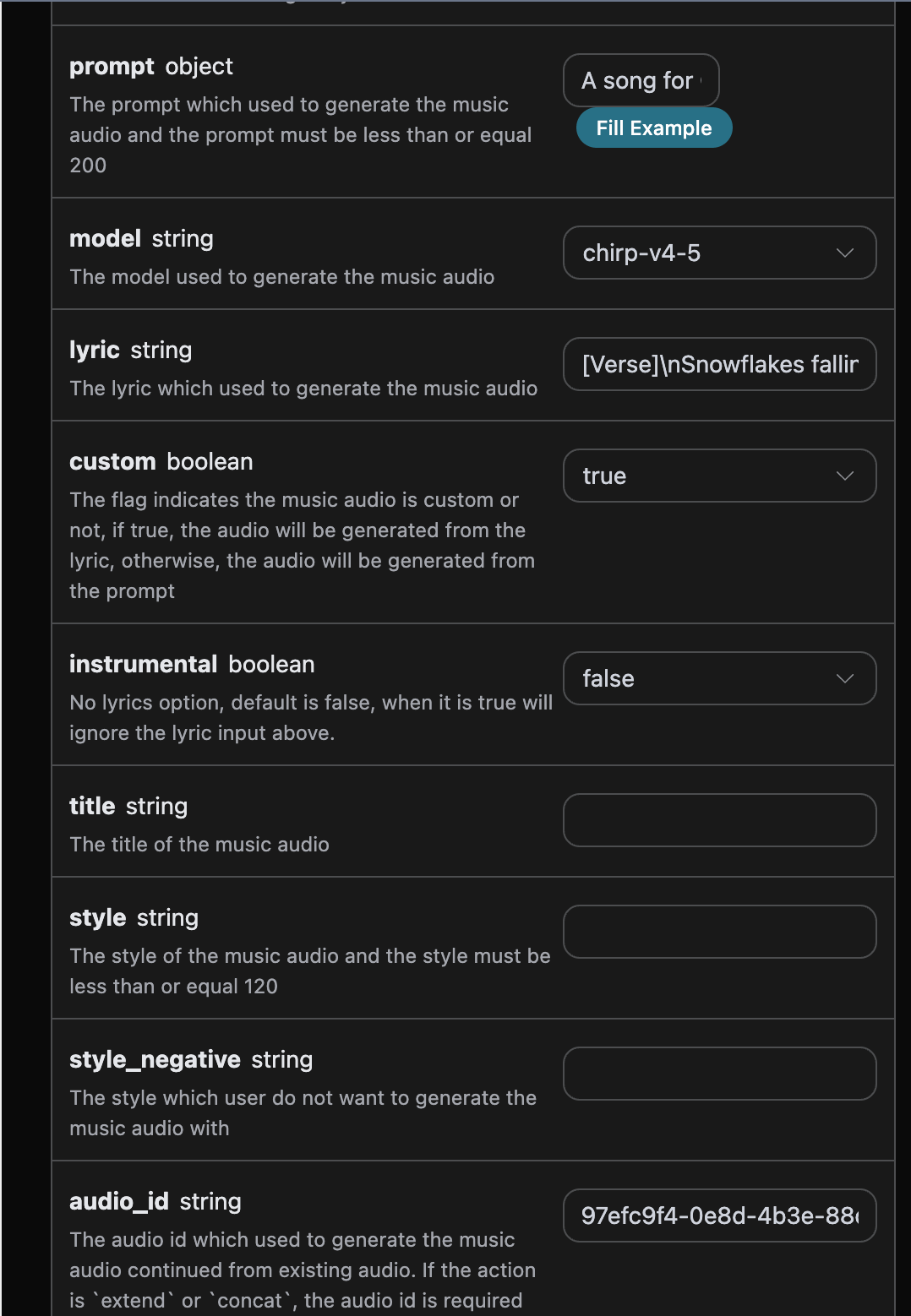
Next, you must fill in the lyrics for the continuation segment, and you can specify the style:
- lyric: Only used to guide the lyrics of the newly generated segment after
continue_at; it will not replace the lyrics before that time point in the source audio. - custom: Set to
true, which means custom generation. This parameter defaults to false, which means generation usingprompt. - style: The song style of the continuation segment, optional.
- continue_at: The continuation boundary, in seconds. For example, 213.5 means generating the subsequent segment starting from 3 minutes and 33.5 seconds.
The continue_at for both extend and upload_extend must be greater than 0 and supports decimal seconds, such as 30.792; it will not be rounded when submitted.
extendis used to continue creating after an existing song, not to replace the lyrics of the entire song. If you want to use new lyrics from the beginning for the entire song, please usegenerateto generate it again; if you want to reinterpret a song with reference to an existing song, you can usecover. When passing in an entire new set of lyrics, the original lyrics beforecontinue_atwill still not be replaced.
An example is filled in as follows:
After filling it in, the following code is automatically generated:
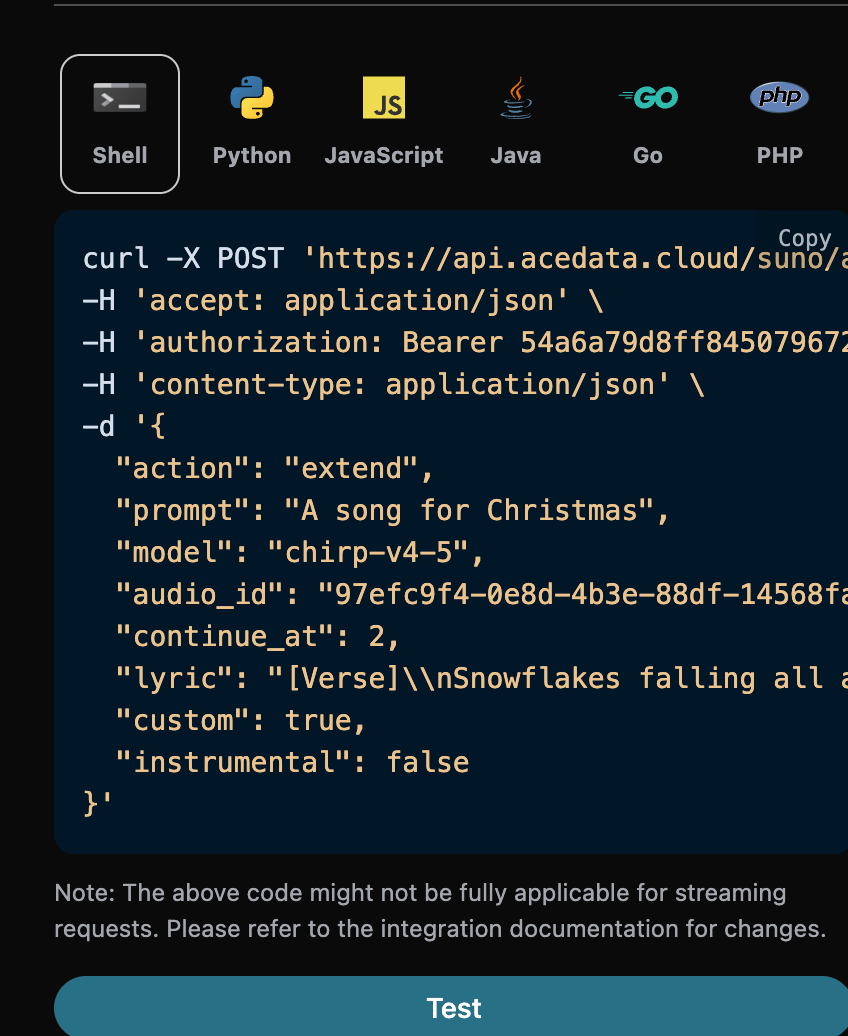
What follows is a real historical call snapshot, where continue_at is 2 seconds, so only the first 2 seconds belong to the original content before the continuation boundary. When actually continuing near the end of a song, this value should be set to the second at which you expect the continuation to begin, and only the new section to be sung after the boundary should be provided in lyric.
The corresponding Python code:
import requests

url = "https://api.ezhou.art/suno/audios"

headers = {
    "accept": "application/json",
    "authorization": "Bearer {token}",
    "content-type": "application/json"
}

payload = {
    "action": "extend",
    "prompt": "A song for Christmas",
    "model": "chirp-v4-5",
    "audio_id": "97efc9f4-0e8d-4b3e-88df-14568fa1b11f",
    "continue_at": 2,
    "lyric": "[Verse]\\nSnowflakes falling all around\\nGlistening white\\nCovering the ground\\nChildren laughing\\nFull of delight\\nIn this winter wonderland tonight\\nSanta's sleigh\\nUp in the sky\\nRudolph's nose shining bright\\nOh my\\nHear the jingle bells\\nRinging so clear\\nBringing joy and holiday cheer\\n[Verse 2]\\nRoasting chestnuts by the fire's glow\\nChristmas lights\\nThey twinkle and show\\nFamilies gathering with love and cheer\\nSpreading warmth to everyone near",
    "custom": True,
    "instrumental": False
}

response = requests.post(url, json=payload, headers=headers)
print(response.text)
Click Run, and you can see that you will get a result as follows:
{
  "success": true,
  "task_id": "75b835d9-30d1-4641-8524-0aeedbdc9e1a",
  "trace_id": "44c41045-a2e1-4d19-aafc-7abd239d0d5c",
  "data": [
    {
      "id": "0a1e1b10-c36a-41c9-9bfb-b26d9d25db98",
      "title": "",
      "image_url": "https://cdn.acedata.cloud/e724d7f13d.png?example=image-005",
      "lyric": "[Verse]\\nSnowflakes falling all around\\nGlistening white\\nCovering the ground\\nChildren laughing\\nFull of delight\\nIn this winter wonderland tonight\\nSanta's sleigh\\nUp in the sky\\nRudolph's nose shining bright\\nOh my\\nHear the jingle bells\\nRinging so clear\\nBringing joy and holiday cheer\\n[Verse 2]\\nRoasting chestnuts by the fire's glow\\nChristmas lights\\nThey twinkle and show\\nFamilies gathering with love and cheer\\nSpreading warmth to everyone near",
      "audio_url": "https://cdn.acedata.cloud/assets/examples/fish/5ade0339-5f11-487e-aacc-06a908271706-8e3fcb0e5547.mp3",
      "video_url": "",
      "created_at": "2025-06-17T16:38:35.509Z",
      "model": "chirp-auk",
      "state": "succeeded",
      "style": "",
      "duration": 165.92
    },
    {
      "id": "4334c5b4-0a44-4b26-a8f6-66cc4dbb8fc3",
      "title": "",
      "image_url": "https://cdn.acedata.cloud/e724d7f13d.png?example=image-006",
      "lyric": "[Verse]\\nSnowflakes falling all around\\nGlistening white\\nCovering the ground\\nChildren laughing\\nFull of delight\\nIn this winter wonderland tonight\\nSanta's sleigh\\nUp in the sky\\nRudolph's nose shining bright\\nOh my\\nHear the jingle bells\\nRinging so clear\\nBringing joy and holiday cheer\\n[Verse 2]\\nRoasting chestnuts by the fire's glow\\nChristmas lights\\nThey twinkle and show\\nFamilies gathering with love and cheer\\nSpreading warmth to everyone near",
      "audio_url": "https://cdn.acedata.cloud/assets/examples/fish/5ade0339-5f11-487e-aacc-06a908271706-8e3fcb0e5547.mp3",
      "video_url": "",
      "created_at": "2025-06-17T16:38:35.509Z",
      "model": "chirp-auk",
      "state": "succeeded",
      "style": "",
      "duration": 158.84
    }
  ]
}
As can be seen, lyric in the result returns the lyrics text used for this continuation task. This field is not a verbatim transcription of the complete finished audio; for extend, the source audio before continue_at still uses the original lyrics, and the new lyrics are only used to guide the continuation segment.
¶ Get the Complete Song
The current model's extend result usually already includes the source audio before continue_at and new content after the boundary. First determine whether it is already a complete song based on the actual duration and content of the returned audio. If what is returned is an independent continuation segment, or if multiple continuation histories need to be explicitly merged into one song, then use the concatenation feature:
- action: Set to
concat. - audio_id: The ID of the last continuation segment.
For example, if the extended song ID is: 0a1e1b10-c36a-41c9-9bfb-b26d9d25db98, then the parameters can be set as follows:
{
  "action": "concat",
  "audio_id": "0a1e1b10-c36a-41c9-9bfb-b26d9d25db98"
}
Keep the other parameters unchanged. What is returned is one complete song, which is the concatenation result of all song segments, but the result contains only one song, as shown below:
{
  "success": true,
  "task_id": "0f794915-8418-4124-93f5-b7eb3a417167",
  "trace_id": "62afcce0-e7e5-44b8-8c2e-4bba12a4f414",
  "data": [
    {
      "id": "0efec7e0-11bf-4313-9981-2c0e7218d7dd",
      "title": "",
      "image_url": "https://cdn.acedata.cloud/e724d7f13d.png?example=image-007",
      "lyric": "[Verse]\\nSnowflakes falling all around\\nGlistening white\\nCovering the ground\\nChildren laughing\\nFull of delight\\nIn this winter wonderland tonight\\nSanta's sleigh\\nUp in the sky\\nRudolph's nose shining bright\\nOh my\\nHear the jingle bells\\nRinging so clear\\nBringing joy and holiday cheer\\n[Verse 2]\\nRoasting chestnuts by the fire's glow\\nChristmas lights\\nThey twinkle and show\\nFamilies gathering with love and cheer\\nSpreading warmth to everyone near\n[Verse]\\nSnowflakes falling all around\\nGlistening white\\nCovering the ground\\nChildren laughing\\nFull of delight\\nIn this winter wonderland tonight\\nSanta's sleigh\\nUp in the sky\\nRudolph's nose shining bright\\nOh my\\nHear the jingle bells\\nRinging so clear\\nBringing joy and holiday cheer\\n[Verse 2]\\nRoasting chestnuts by the fire's glow\\nChristmas lights\\nThey twinkle and show\\nFamilies gathering with love and cheer\\nSpreading warmth to everyone near",
      "audio_url": "https://cdn.acedata.cloud/assets/examples/fish/5ade0339-5f11-487e-aacc-06a908271706-8e3fcb0e5547.mp3",
      "video_url": "",
      "created_at": "2025-06-17T16:43:06.718Z",
      "model": "chirp-auk",
      "state": "succeeded",
      "style": "",
      "duration": 167.91997916666668,
      "concat_history": [
        {
          "continue_at": 2,
          "id": "97efc9f4-0e8d-4b3e-88df-14568fa1b11f",
          "infill": false,
          "source": "web",
          "type": "gen"
        },
        {
          "id": "0a1e1b10-c36a-41c9-9bfb-b26d9d25db98"
        }
      ]
    }
  ]
}
¶ Music Cover
After continuing to generate a song based on an existing song, the style of the returned song may not be suitable. If you want to create a cover version of a previously generated song (custom uploaded music is also supported), you need to use the music cover method, and can specify the following:
- action: Set to
cover; when performing a cover operation on custom uploaded music, it must be set to:upload_cover. - audio_id: The ID of the previously generated song.
If you need to use a specified voice for the cover, you can also pass in persona_id. A private voice created through /suno/voices must first be used to upload the original song in /suno/upload with the same persona_id, and then use the returned audio_id for upload_cover. All steps must use the same service channel. There is no need to additionally specify vocal_gender; gender preference cannot replace a voice ID.
For example, if the ID of the previously generated song is: 0a1e1b10-c36a-41c9-9bfb-b26d9d25db98, then the parameters can be set as follows:
{
  "action": "cover",
  "audio_id": "0a1e1b10-c36a-41c9-9bfb-b26d9d25db98",
  "prompt": "A song for Christmas",
  "model": "chirp-v4-5"
}
Keep the other parameters unchanged. What is returned is a covered version of the song, which is the result of creating a cover version of the previously generated song, as shown below:
{
  "success": true,
  "task_id": "b9d43d06-2e0a-4b5e-9e0d-7dfab32e00ab",
  "trace_id": "6c5e567d-0fdc-4c44-9b36-4090d9a75ff5",
  "data": [
    {
      "id": "6988fa57-f810-41cf-afab-7838db2c77dc",
      "title": "",
      "image_url": "https://cdn.acedata.cloud/e724d7f13d.png?example=image-008",
      "lyric": "",
      "audio_url": "https://cdn.acedata.cloud/assets/examples/fish/5ade0339-5f11-487e-aacc-06a908271706-8e3fcb0e5547.mp3",
      "video_url": "",
      "created_at": "2025-06-17T16:44:13.007Z",
      "model": "chirp-auk",
      "state": "succeeded",
      "style": "",
      "duration": 182.4
    },
    {
      "id": "ce98b991-0258-4f05-8245-e43d4efa8fb8",
      "title": "",
      "image_url": "https://cdn.acedata.cloud/e724d7f13d.png?example=image-009",
      "lyric": "",
      "audio_url": "https://cdn.acedata.cloud/assets/examples/fish/5ade0339-5f11-487e-aacc-06a908271706-8e3fcb0e5547.mp3",
      "video_url": "",
      "created_at": "2025-06-17T16:44:13.007Z",
      "model": "chirp-auk",
      "state": "succeeded",
      "style": "",
      "duration": 179.72
    }
  ]
}
The generated result is similar to the above, and this completes the process of generating a cover version of the previously generated song.
¶ Replace Section
replace_section regenerates the selected segment according to the time range of the source song and stitches the result back into the original song. replace_section_result_mode defaults to full_song, returning 2 complete songs that can be played directly, without needing to call concat again.
¶ How to Fill in the Input
action:replace_section.audio_id: The ID of the complete song to edit. When editing again, use thedata[].idof the complete song selected previously, not thetask_id.model: The song generation model, for example,chirp-v6.lyric: The local new lyrics to be sung in the selected range. There is no need to provide the full lyrics of the entire song in order to obtain a complete song.prompt: Clearly specify the local new lyrics to be replaced this time. When changing lyrics, it is recommended to enter the same content aslyricto avoid the two fields expressing different lyrics. Existing requests that provide only locallyricand omitpromptcan still be used, but addingpromptitself does not guarantee successful lyric changes.style,negative_tags: Optional style descriptions and exclusions;promptin this operation is not the inspiration description used for normal song generation.replace_section_start,replace_section_end: The start and end times of the selected range in the source song for this operation, in seconds, with decimal support. The start point must not be less than 0, and the end point must be greater than the start point and must not exceed the duration of the source song.replace_section_result_mode:full_song(default) returns 2 complete songs;candidatesreturns 2 replacement candidates that have not yet been concatenated.
Do not treat “lyric must be the complete lyrics after replacement, and prompt must be local lyrics” as a general usage pattern. Full-lyrics input may produce excessively long replacement content in some tasks, making the entire song significantly longer after concatenation. Local input also does not guarantee a fixed duration or word-for-word adherence to the lyrics; this is generative editing, and the actual audio needs to be checked.
¶ Start a task and obtain the complete song
Below is an example of the request format. Please replace YOUR_COMPLETED_AUDIO_ID and the time range with your own source song ID and actual selected range; the example assumes that seconds 30–50 correspond to the following four lines.
{
  "action": "replace_section",
  "audio_id": "YOUR_COMPLETED_AUDIO_ID",
  "model": "chirp-v6",
  "custom": false,
  "instrumental": false,
  "lyric": "晚风吹过安静的街巷\n绿色风筝停在我身旁\n我们沿着河岸轻轻唱\n把今天的故事放心上",
  "prompt": "晚风吹过安静的街巷\n绿色风筝停在我身旁\n我们沿着河岸轻轻唱\n把今天的故事放心上",
  "replace_section_start": 30.0,
  "replace_section_end": 50.0,
  "replace_section_result_mode": "full_song",
  "async": true
}
After submission, use the returned task_id to query /suno/tasks, with the request body {"action":"retrieve","id":"YOUR_TASK_ID"}. After the task is completed, obtain the id, audio_url, and duration of the two complete songs from response.data in the task response, then listen to them and select one. success: true means that the task was successfully executed; it does not mean that the new lyrics have been sung word for word or that the duration meets expectations.
¶ Selected range, result inspection, and editing again
- First listen to the source song, then use the timing information from
/suno/timingto determine the selected range, covering complete musical phrases whenever possible. Do not select ranges according to fixed indices in the lyrics array, and do not expect the rhythm to remain completely unchanged when replacing a range containing more musical phrases with only a few lyric lines. - Keep the number of lines, word count, and rhythm of the new lyrics as close as possible to the original content in the selected range. Even changing only a few words requires listening verification and cannot guarantee success based on that alone.
- Check whether the new lyrics are sung in the target range, whether the transitions before and after are natural, and whether the duration of the entire song is reasonable.
full_songmeans that a complete song is returned; it does not mean it has the same length as the original song. When the replacement segment becomes longer, the latter half will shift accordingly. Thedurationrequest parameter is only used for normal generation and cannot lock the duration of a replacement segment. - The returned
lyricis lyrics metadata. In complete-song mode, complete lyrics will be assembled when source lyric timing information is available; otherwise, it may be empty. It is not an audio transcription, and the appearance of new lyrics does not prove that the audio has sung the new lyrics. Timing alignment information should also be checked together with listening, especially for outputs that have already been edited. - When editing again, use the selected complete finished product ID as the new
audio_id, and recheck the duration and selected range of that finished product. Do not reuse the time coordinates from before editing, and do not directly use the entirelyricreturned last time as the local input for this time.
If the task has been completed but it still sings the old lyrics, omits lyrics, or becomes significantly longer, first check the source song ID, selected range, and local lyrics, then check the other result. Increasing the task query frequency will not change content that has already been generated. If the issue persists, retain the task_id, source song ID, request fields, selected range, and result audio for verification.
¶ Optional: obtain candidates first, then concatenate manually
Only when you need to choose a replacement candidate yourself, set replace_section_result_mode: "candidates". Candidates may contain context, and you cannot treat them as complete songs based only on candidate duration. After selecting one, call concat with the candidate's data[].id, then obtain the complete finished product.
The default full_song has already completed concatenation, so there is no need to perform this step.
¶ Vocal and instrumental separation
When secondary creation requires separate operations on the accompaniment and vocals after generating a song, you can separate the instrumental accompaniment and a cappella vocals. You can specify the following content:
- action: The content is
stems. - audio_id: The ID of the previously generated song.
For example, if the ID of the originally generated song is: ec13e502-d043-4eb2-92ee-e900c6da69d1, then you can set the parameters as follows:
{
  "action": "stems",
  "audio_id": "ec13e502-d043-4eb2-92ee-e900c6da69d1"
}
Through the above parameters, you can obtain the result of vocal and instrumental separation, as follows:
{
  "success": true,
  "task_id": "4050affc-f8a6-4cba-a86c-bf201eed053d",
  "trace_id": "5107ee58-687d-422f-9195-fa0e82e1fcc8",
  "data": [
    {
      "id": "e3de0928-085a-42c4-b982-3b24738d1989",
      "title": "Deck the Sky - Vocals",
      "image_url": "https://cdn.acedata.cloud/e724d7f13d.png?example=image-013",
      "lyric": "[Verse]\nSnowflakes dance on rooftops high\nChildren's laughter fills the sky\nCarols ring from church bells loud\nHolidays a joyful crowd\n[Verse 2]\nCandy canes and cocoa warm\nWrapped up tight in our own storm\nStockings hung with dreams and cheer\nMagic growing every year\n[Chorus]\nDeck the sky with twinkling stars\nHoliday joy feels ours and ours\nSing the songs of love and light\nChristmas glows so pure and bright\n[Verse 3]\nFireside tales of long ago\nReindeer prance in icy glow\nEvergreen and tinsel’s gleam\nChristmas time a lovely dream\n[Bridge]\nHearts are full with friends and kin\nMistletoe for love to win\nGifts of love and hope we share\nChristmas spirit everywhere\n[Chorus]\nDeck the sky with twinkling stars\nHoliday joy feels ours and ours\nSing the songs of love and light\nChristmas glows so pure and bright",
      "audio_url": "https://cdn.acedata.cloud/assets/examples/fish/5ade0339-5f11-487e-aacc-06a908271706-8e3fcb0e5547.mp3",
      "video_url": "https://cdn.acedata.cloud/assets/examples/gemini/04a043bd-6b23-4b4e-945c-ce48158c3eee-3a89912507c7.mp4?example=video-001",
      "created_at": "2025-01-05T07:49:16.881Z",
      "model": "",
      "state": "succeeded",
      "style": "holiday, jolly",
      "duration": 174.16
    },
    {
      "id": "ad5d7c89-709c-4eb4-a5a6-72f9f5e57fdb",
      "title": "Deck the Sky - Instrumental",
      "image_url": "https://cdn.acedata.cloud/e724d7f13d.png?example=image-014",
      "lyric": "",
      "audio_url": "https://cdn.acedata.cloud/assets/examples/fish/5ade0339-5f11-487e-aacc-06a908271706-8e3fcb0e5547.mp3",
      "video_url": "https://cdn.acedata.cloud/assets/examples/gemini/04a043bd-6b23-4b4e-945c-ce48158c3eee-3a89912507c7.mp4?example=video-002",
      "created_at": "2025-01-05T07:49:16.892Z",
      "model": "",
      "state": "succeeded",
      "style": "holiday, jolly",
      "duration": 174.16
    }
  ]
}
The generated result is similar to the above, which completes the process of separating vocals and music from the originally generated song.
¶ Full Track Vocal and Music Separation
The task will return a successful final state only after all audio tracks have finished generating. The appearance of a playable URL during processing does not mean that the entire group of audio tracks has been completed.
When full track vocal and music separation is needed after generating a song, you can specify the following content:
- action: The content is
all_stems. - audio_id: The ID of the previously generated song.
For example, if the song ID after the original generation is: bdf23a5a-59f5-4103-b452-054a824a7f9f, then the parameters can be set as follows:
{
  "action": "all_stems",
  "audio_id": "bdf23a5a-59f5-4103-b452-054a824a7f9f"
}
Through the above parameters, the result of full track vocal and music separation can be obtained, as follows:
  "success": true,
  "task_id": "f4b16fb9-8478-4857-88c7-b9a1f0bb9518",
  "trace_id": "9c560ebd-4fc6-4bdb-988a-8890160a92fb",
  "data": [
    {
      "id": "f86ca64a-9519-4ea7-a592-52438e001412",
      "title": "安全之弦 (Vocals)",
      "image_url": "https://cdn.acedata.cloud/e724d7f13d.png?example=image-015",
      "lyric": "",
      "audio_url": "https://cdn.acedata.cloud/assets/examples/fish/5ade0339-5f11-487e-aacc-06a908271706-8e3fcb0e5547.mp3",
      "video_url": "",
      "created_at": "2025-06-11T02:40:30.770Z",
      "model": "chirp-ahi-stem-12-t1",
      "state": "succeeded",
      "duration": 154.92
    }, {
      "id": "99e649a7-a394-47b9-a915-d7f847285a36",
      "title": "安全之弦 (Backing Vocals)",
      "image_url": "https://cdn.acedata.cloud/e724d7f13d.png?example=image-016",
      "lyric": "",
      "audio_url": "https://cdn.acedata.cloud/assets/examples/fish/5ade0339-5f11-487e-aacc-06a908271706-8e3fcb0e5547.mp3",
      "video_url": "",
      "created_at": "2025-06-11T02:40:30.770Z",
      "model": "chirp-ahi-stem-12-t1",
      "state": "succeeded",
      "duration": 154.92
    }, {
      "id": "6d710bf7-809f-4fdc-bb63-b8cb3a456d42",
      "title": "安全之弦 (Drums)",
      "image_url": "https://cdn.acedata.cloud/e724d7f13d.png?example=image-017",
      "lyric": "",
      "audio_url": "https://cdn.acedata.cloud/assets/examples/fish/5ade0339-5f11-487e-aacc-06a908271706-8e3fcb0e5547.mp3",
      "video_url": "",
      "created_at": "2025-06-11T02:40:30.770Z",
      "model": "chirp-ahi-stem-12-t1",
      "state": "succeeded",
      "duration": 154.92
    }, {
      "id": "e05f07e3-7d80-4713-8e51-7f176c733543",
      "title": "安全之弦 (Bass)",
      "image_url": "https://cdn.acedata.cloud/e724d7f13d.png?example=image-018",
      "lyric": "",
      "audio_url": "https://cdn.acedata.cloud/assets/examples/fish/5ade0339-5f11-487e-aacc-06a908271706-8e3fcb0e5547.mp3",
      "video_url": "",
      "created_at": "2025-06-11T02:40:30.770Z",
      "model": "chirp-ahi-stem-12-t1",
      "state": "succeeded",
      "duration": 154.92
    },
{
      "id": "93fe7cd8-62fd-4739-b78e-142c7e0b8562",
      "title": "Strings of Safety (Guitar)",
      "image_url": "https://cdn.acedata.cloud/e724d7f13d.png?example=image-019",
      "lyric": "",
      "audio_url": "https://cdn.acedata.cloud/assets/examples/fish/5ade0339-5f11-487e-aacc-06a908271706-8e3fcb0e5547.mp3",
      "video_url": "",
      "created_at": "2025-06-11T02:40:30.770Z",
      "model": "chirp-ahi-stem-12-t1",
      "state": "succeeded",
      "duration": 154.92
    }, {
      "id": "8367d71c-fdd3-441c-8ebe-70c33cca821b",
      "title": "Strings of Safety (Keyboard)",
      "image_url": "https://cdn.acedata.cloud/e724d7f13d.png?example=image-020",
      "lyric": "",
      "audio_url": "https://cdn.acedata.cloud/assets/examples/fish/5ade0339-5f11-487e-aacc-06a908271706-8e3fcb0e5547.mp3",
      "video_url": "",
      "created_at": "2025-06-11T02:40:30.770Z",
      "model": "chirp-ahi-stem-12-t1",
      "state": "succeeded",
      "duration": 154.92
    }, {
      "id": "28c03590-731c-416e-8fd3-95cdb3d75043",
      "title": "Strings of Safety (Percussion)",
      "image_url": "https://cdn.acedata.cloud/e724d7f13d.png?example=image-021",
      "lyric": "",
      "audio_url": "https://cdn.acedata.cloud/assets/examples/fish/5ade0339-5f11-487e-aacc-06a908271706-8e3fcb0e5547.mp3",
      "video_url": "",
      "created_at": "2025-06-11T02:40:30.770Z",
      "model": "chirp-ahi-stem-12-t1",
      "state": "succeeded",
      "duration": 154.92
    }, {
      "id": "3d4c1a28-4e1c-485a-8201-d21bb93aca2f",
      "title": "Strings of Safety (Strings)",
      "image_url": "https://cdn.acedata.cloud/e724d7f13d.png?example=image-022",
      "lyric": "",
      "audio_url": "https://cdn.acedata.cloud/assets/examples/fish/5ade0339-5f11-487e-aacc-06a908271706-8e3fcb0e5547.mp3",
      "video_url": "",
      "created_at": "2025-06-11T02:40:30.770Z",
      "model": "chirp-ahi-stem-12-t1",
      "state": "succeeded",
      "duration": 154.92
    }, {
      "id": "b9db8ded-01ec-4e37-b8a5-64aab3a814c2",
      "title": "Strings of Safety (Synth)",
      "image_url": "https://cdn.acedata.cloud/e724d7f13d.png?example=image-023",
      "lyric": "",
      "audio_url": "https://cdn.acedata.cloud/assets/examples/fish/5ade0339-5f11-487e-aacc-06a908271706-8e3fcb0e5547.mp3",
      "video_url": "",
      "created_at": "2025-06-11T02:40:30.770Z",
      "model": "chirp-ahi-stem-12-t1",
      "state": "succeeded",
      "duration": 154.92
    }, {
      "id": "10a5248e-32e6-42b9-8da1-678a8a392aef",
      "title": "Strings of Safety (FX)",
      "image_url": "https://cdn.acedata.cloud/e724d7f13d.png?example=image-024",
      "lyric": "",
      "audio_url": "https://cdn.acedata.cloud/assets/examples/fish/5ade0339-5f11-487e-aacc-06a908271706-8e3fcb0e5547.mp3",
      "video_url": "",
      "created_at": "2025-06-11T02:40:30.770Z",
      "model": "chirp-ahi-stem-12-t1",
      "state": "succeeded",
      "duration": 154.92
    }, {
      "id": "2d272128-111f-4901-8f62-5ae1eb43095a",
      "title": "Strings of Safety (Brass)",
      "image_url": "https://cdn.acedata.cloud/e724d7f13d.png?example=image-025",
      "lyric": "",
      "audio_url": "https://cdn.acedata.cloud/assets/examples/fish/5ade0339-5f11-487e-aacc-06a908271706-8e3fcb0e5547.mp3",
      "video_url": "",
      "created_at": "2025-06-11T02:40:30.770Z",
      "model": "chirp-ahi-stem-12-t1",
      "state": "succeeded",
      "duration": 154.92
    }, {
      "id": "4a7c19a5-f8d4-4e4a-add9-aa0bad9307cc",
      "title": "Strings of Safety (Woodwinds)",
      "image_url": "https://cdn.acedata.cloud/e724d7f13d.png?example=image-026",
      "lyric": "",
      "audio_url": "https://cdn.acedata.cloud/assets/examples/fish/5ade0339-5f11-487e-aacc-06a908271706-8e3fcb0e5547.mp3",
      "video_url": "",
      "created_at": "2025-06-11T02:40:30.770Z",
      "model": "chirp-ahi-stem-12-t1",
      "state": "succeeded",
      "duration": 154.92
    }, {
      "id": "1ca774f9-3e75-48a6-941b-808875eadcd2",
      "title": "Strings of Safety (Vocals)",
      "image_url": "https://cdn.acedata.cloud/e724d7f13d.png?example=image-027",
      "lyric": "",
      "audio_url": "https://cdn.acedata.cloud/assets/examples/fish/5ade0339-5f11-487e-aacc-06a908271706-8e3fcb0e5547.mp3",
      "video_url": "",
      "created_at": "2025-06-11T02:40:30.770Z",
      "model": "chirp-ahi-stem-12-t1",
      "state": "succeeded",
      "duration": 154.92
    }, {
      "id": "14c5ffc7-addf-4fee-afd2-4b8b3e7ee470",
      "title": "Strings of Safety (Backing Vocals)",
      "image_url": "https://cdn.acedata.cloud/e724d7f13d.png?example=image-028",
      "lyric": "",
      "audio_url": "https://cdn.acedata.cloud/assets/examples/fish/5ade0339-5f11-487e-aacc-06a908271706-8e3fcb0e5547.mp3",
      "video_url": "",
      "created_at": "2025-06-11T02:40:30.771Z",
      "model": "chirp-ahi-stem-12-t1",
      "state": "succeeded",
      "duration": 154.92
    },
{
      "id": "9d044557-450d-48ab-90dc-8eaf6f1cdb6c",
      "title": "String of Safety (Drums)",
      "image_url": "https://cdn.acedata.cloud/e724d7f13d.png?example=image-029",
      "lyric": "",
      "audio_url": "https://cdn.acedata.cloud/assets/examples/fish/5ade0339-5f11-487e-aacc-06a908271706-8e3fcb0e5547.mp3",
      "video_url": "",
      "created_at": "2025-06-11T02:40:30.771Z",
      "model": "chirp-ahi-stem-12-t1",
      "state": "succeeded",
      "duration": 154.92
    }, {
      "id": "efd052d0-c12f-47b3-8282-1f3ef7610e1f",
      "title": "String of Safety (Bass)",
      "image_url": "https://cdn.acedata.cloud/e724d7f13d.png?example=image-030",
      "lyric": "",
      "audio_url": "https://cdn.acedata.cloud/assets/examples/fish/5ade0339-5f11-487e-aacc-06a908271706-8e3fcb0e5547.mp3",
      "video_url": "",
      "created_at": "2025-06-11T02:40:30.771Z",
      "model": "chirp-ahi-stem-12-t1",
      "state": "succeeded",
      "duration": 154.92
    }, {
      "id": "5775372b-292e-4420-96ef-60e57a60cc1f",
      "title": "String of Safety (Guitar)",
      "image_url": "https://cdn.acedata.cloud/e724d7f13d.png?example=image-031",
      "lyric": "",
      "audio_url": "https://cdn.acedata.cloud/assets/examples/fish/5ade0339-5f11-487e-aacc-06a908271706-8e3fcb0e5547.mp3",
      "video_url": "",
      "created_at": "2025-06-11T02:40:30.771Z",
      "model": "chirp-ahi-stem-12-t1",
      "state": "succeeded",
      "duration": 154.92
    }, {
      "id": "dab3f220-19cd-408e-9b96-30ec18f5b049",
      "title": "String of Safety (Keyboard)",
      "image_url": "https://cdn.acedata.cloud/e724d7f13d.png?example=image-032",
      "lyric": "",
      "audio_url": "https://cdn.acedata.cloud/assets/examples/fish/5ade0339-5f11-487e-aacc-06a908271706-8e3fcb0e5547.mp3",
      "video_url": "",
      "created_at": "2025-06-11T02:40:30.771Z",
      "model": "chirp-ahi-stem-12-t1",
      "state": "succeeded",
      "duration": 154.92
    }, {
      "id": "2d0cd6d4-af82-4bb5-86fe-d92bdb367157",
      "title": "String of Safety (Percussion)",
      "image_url": "https://cdn.acedata.cloud/e724d7f13d.png?example=image-033",
      "lyric": "",
      "audio_url": "https://cdn.acedata.cloud/assets/examples/fish/5ade0339-5f11-487e-aacc-06a908271706-8e3fcb0e5547.mp3",
      "video_url": "",
      "created_at": "2025-06-11T02:40:30.771Z",
      "model": "chirp-ahi-stem-12-t1",
      "state": "succeeded",
      "duration": 154.92
    }, {
      "id": "f3191a1a-5e8d-4afe-b638-3add222d52cd",
      "title": "String of Safety (Strings)",
      "image_url": "https://cdn.acedata.cloud/e724d7f13d.png?example=image-034",
      "lyric": "",
      "audio_url": "https://cdn.acedata.cloud/assets/examples/fish/5ade0339-5f11-487e-aacc-06a908271706-8e3fcb0e5547.mp3",
      "video_url": "",
      "created_at": "2025-06-11T02:40:30.771Z",
      "model": "chirp-ahi-stem-12-t1",
      "state": "succeeded",
      "duration": 154.92
    }, {
      "id": "a8834ea5-200b-4206-a812-9780ef336660",
      "title": "String of Safety (Synth)",
      "image_url": "https://cdn.acedata.cloud/e724d7f13d.png?example=image-035",
      "lyric": "",
      "audio_url": "https://cdn.acedata.cloud/assets/examples/fish/5ade0339-5f11-487e-aacc-06a908271706-8e3fcb0e5547.mp3",
      "video_url": "",
      "created_at": "2025-06-11T02:40:30.771Z",
      "model": "chirp-ahi-stem-12-t1",
      "state": "succeeded",
      "duration": 154.92
    }, {
      "id": "f50d1a31-ef72-400a-b8ae-0367849d007d",
      "title": "String of Safety (FX)",
      "image_url": "https://cdn.acedata.cloud/e724d7f13d.png?example=image-036",
      "lyric": "",
      "audio_url": "https://cdn.acedata.cloud/assets/examples/fish/5ade0339-5f11-487e-aacc-06a908271706-8e3fcb0e5547.mp3",
      "video_url": "",
      "created_at": "2025-06-11T02:40:30.771Z",
      "model": "chirp-ahi-stem-12-t1",
      "state": "succeeded",
      "duration": 154.92
    }, {
      "id": "cb581673-23cc-40d6-9f9b-0f76720f0d18",
      "title": "String of Safety (Brass)",
      "image_url": "https://cdn.acedata.cloud/e724d7f13d.png?example=image-037",
      "lyric": "",
      "audio_url": "https://cdn.acedata.cloud/assets/examples/fish/5ade0339-5f11-487e-aacc-06a908271706-8e3fcb0e5547.mp3",
      "video_url": "",
      "created_at": "2025-06-11T02:40:30.771Z",
      "model": "chirp-ahi-stem-12-t1",
      "state": "succeeded",
      "duration": 154.92
    }, {
      "id": "d91cfb52-f0a3-4546-bf8a-2ad14c3775a5",
      "title": "String of Safety (Woodwinds)",
      "image_url": "https://cdn.acedata.cloud/e724d7f13d.png?example=image-038",
      "lyric": "",
      "audio_url": "https://cdn.acedata.cloud/assets/examples/fish/5ade0339-5f11-487e-aacc-06a908271706-8e3fcb0e5547.mp3",
      "video_url": "",
      "created_at": "2025-06-11T02:40:30.771Z",
      "model": "chirp-ahi-stem-12-t1",
      "state": "succeeded",
      "duration": 154.92
    }
  ]
}
The generated results are similar to the above, which completes the process of separating the original generated song into stems.
¶ Add Stem
add_stem generates a target instrument or vocal track for the specified audio, called via POST /suno/audios.
- Required:
action,audio_id,stem_type. - Optional:
model,prompt,title,style,negative_tags,weirdness,style_influence,audio_weight,max_mode,variety. - Billing: 0.672 Credits in normal mode; 1.344 Credits when
max_modeistrue.
{
  "action": "add_stem",
  "audio_id": "dead4ee5-df4d-417b-8f7e-717722fae51a",
  "stem_type": "bass",
  "model": "chirp-v6",
  "prompt": "Add warm bass guitar",
  "style": "minimal piano pulse with warm bass guitar",
  "negative_tags": "vocals",
  "variety": "normal",
  "max_mode": false,
  "async": true
}
Final-state response:
{
  "success": true,
  "task_id": "82851953-9590-4334-8bb8-ae30ccadc815",
  "trace_id": "862bbcce-1678-44ff-982d-8b439c126a5e",
  "data": [
    {
      "id": "0adc26ca-2720-4c69-b237-457a986d70e3",
          "audio_url": "https://cdn.acedata2.cloud/suno/0adc26ca-2720-4c69-b237-457a986d70e3.mp3",
      "model": "chirp-v6",
      "state": "succeeded",
      "duration": 12.8
    },
    {
      "id": "e2d39a6c-1d20-4a40-adaf-b2551815d869",
          "audio_url": "https://cdn.acedata2.cloud/suno/e2d39a6c-1d20-4a40-adaf-b2551815d869.mp3",
      "model": "chirp-v6",
      "state": "succeeded",
      "duration": 12.36
    }
  ],
  "cost": {"amount": 0.6048, "currency": "credit", "list_amount": 0.672}
}
¶ Extract Stems
extract_stem extracts the target stem from the specified audio, while also returning the complementary version with that stem removed, called through POST /suno/audios.
- Required:
action,audio_id,stem_type. - Optional:
audio_format; the current public dual-channel contract only supportsmp3. - Billing: 1.12 Credits.
{
  "action": "extract_stem",
  "audio_id": "dead4ee5-df4d-417b-8f7e-717722fae51a",
  "stem_type": "bass",
  "audio_format": "mp3",
  "async": true
}
The data in the final-state response retains a flat audio list, while stem_sets represents the corresponding relationship between the target stem and the complementary stem:
{
  "success": true,
  "task_id": "ae9557d0-4ff7-4a35-bcde-d881e78fbfe5",
  "trace_id": "82c51a55-7627-41a5-b72b-1b9775ca25f2",
  "data": [
    {"id":"3084d7e1-4278-4733-8b56-56f7ecf3f859","title":"(Bass)","audio_url":"https://cdn.acedata2.cloud/suno/3084d7e1-4278-4733-8b56-56f7ecf3f859.mp3","model":"chirp-v6","state":"succeeded","duration":12.8,"stem_set":1},
    {"id":"19b83ca9-a51d-494f-a41d-5b0957f3295e","title":"(Without Bass)","audio_url":"https://cdn.acedata2.cloud/suno/19b83ca9-a51d-494f-a41d-5b0957f3295e.mp3","model":"chirp-v6","state":"succeeded","duration":12.8,"stem_set":1},
    {"id":"7eb431e8-f4db-4915-902e-0e89d2b3185a","title":"(Bass)","audio_url":"https://cdn.acedata2.cloud/suno/7eb431e8-f4db-4915-902e-0e89d2b3185a.mp3","model":"chirp-v6","state":"succeeded","duration":12.8,"stem_set":2},
    {"id":"495d29cc-5790-4d0a-8b95-9551a6127b61","title":"(Without Bass)","audio_url":"https://cdn.acedata2.cloud/suno/495d29cc-5790-4d0a-8b95-9551a6127b61.mp3","model":"chirp-v6","state":"succeeded","duration":12.8,"stem_set":2}
  ],
  "stem_sets": [
    {"stem_type":"bass","isolated":{"id":"3084d7e1-4278-4733-8b56-56f7ecf3f859","state":"succeeded","stem_set":1},"remainder":{"id":"19b83ca9-a51d-494f-a41d-5b0957f3295e","state":"succeeded","stem_set":1}},
    {"stem_type":"bass","isolated":{"id":"7eb431e8-f4db-4915-902e-0e89d2b3185a","state":"succeeded","stem_set":2},"remainder":{"id":"495d29cc-5790-4d0a-8b95-9551a6127b61","state":"succeeded","stem_set":2}}
  ],
  "cost": {"amount": 1.008, "currency": "credit", "list_amount": 1.12}
}
¶ Generate Sound Effects
sounds generates one-shot or loopable sound effects based on text descriptions, called through POST /suno/audios.
- Required:
action,sound,sound_type. - Optional:
model,bpm,key,audio_format;audio_formatcurrently only supportsmp3. sound_type:one-shotorloop.- Billing: 0.112 Credits.
{
  "action": "sounds",
  "sound": "single soft analog synth pluck, no reverb",
  "sound_type": "one-shot",
  "model": "chirp-v6",
  "bpm": 120,
  "key": "C",
  "audio_format": "mp3",
  "async": true
}
{
  "success": true,
  "task_id": "f6716546-d118-40a0-ad15-09999f9f22ba",
  "trace_id": "da4c7895-e494-4bd8-83bd-132e006c94e3",
  "data": [
    {"id":"b3cd3e7d-96e4-48ef-abde-73c7ddee8b4a","title":"single soft analog synth pluck, no reverb","audio_url":"https://cdn.acedata2.cloud/suno/b3cd3e7d-96e4-48ef-abde-73c7ddee8b4a.mp3","model":"chirp-v6","state":"succeeded","duration":10},
    {"id":"f1517867-b76a-4cdf-b006-9ce6e653e0a5","title":"single soft analog synth pluck, no reverb","audio_url":"https://cdn.acedata2.cloud/suno/f1517867-b76a-4cdf-b006-9ce6e653e0a5.mp3","model":"chirp-v6","state":"succeeded","duration":10}
  ],
  "cost": {"amount": 0.1008, "currency": "credit", "list_amount": 0.112}
}
¶ Adjust Audio Speed
adjust_speed adjusts the playback speed of the specified audio, called via POST /suno/audios.
- Required:
action,audio_id,speed_multiplier,title. - Optional:
keep_pitch. speed_multiplier: range 0.25–4.- Billing: 0.28 Credits.
{
  "action": "adjust_speed",
  "audio_id": "dead4ee5-df4d-417b-8f7e-717722fae51a",
  "speed_multiplier": 1.1,
  "keep_pitch": true,
  "title": "Suno contract verification speed 1.1x",
  "async": true
}
The source audio duration is 9.8 seconds, and the result at 1.1x speed is 8.909090909 seconds:
{
  "success": true,
  "task_id": "c5860fdd-76b1-40a1-b5b5-ec047e471c8a",
  "trace_id": "292ed097-3631-441c-ac80-52f326b62726",
  "data": [
    {
      "id": "02534b52-45a7-4961-834a-f473a407e62c",
      "title": "Suno contract verification speed 1.1x",
      "audio_url": "https://cdn.acedata2.cloud/suno/02534b52-45a7-4961-834a-f473a407e62c.mp3",
      "model": "chirp-v6",
      "state": "succeeded",
      "duration": 8.909090909090908
    }
  ],
  "cost": {"amount": 0.252, "currency": "credit", "list_amount": 0.28}
}
The generation model is random. The API guarantees consistent parameter semantics, task status, and response structure, but does not guarantee that different requests generate exactly the same waveform.
¶ Advanced Parameters for Custom Generation
The official version allows the use of advanced parameters weirdness==>Weirdness, style_influence==>Style Influence, and audio_weight==>Audio Influence for generation in custom mode, corresponding to the following official example:
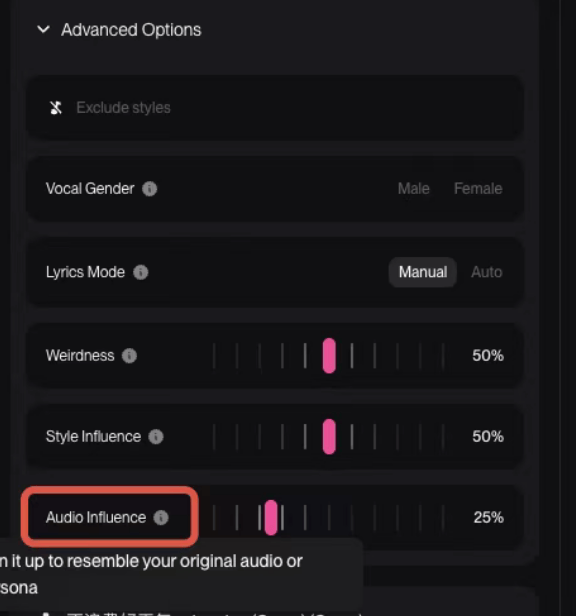
The ranges of the advanced parameters are all between 0 and 1, and the specific parameters are shown in the figure below:
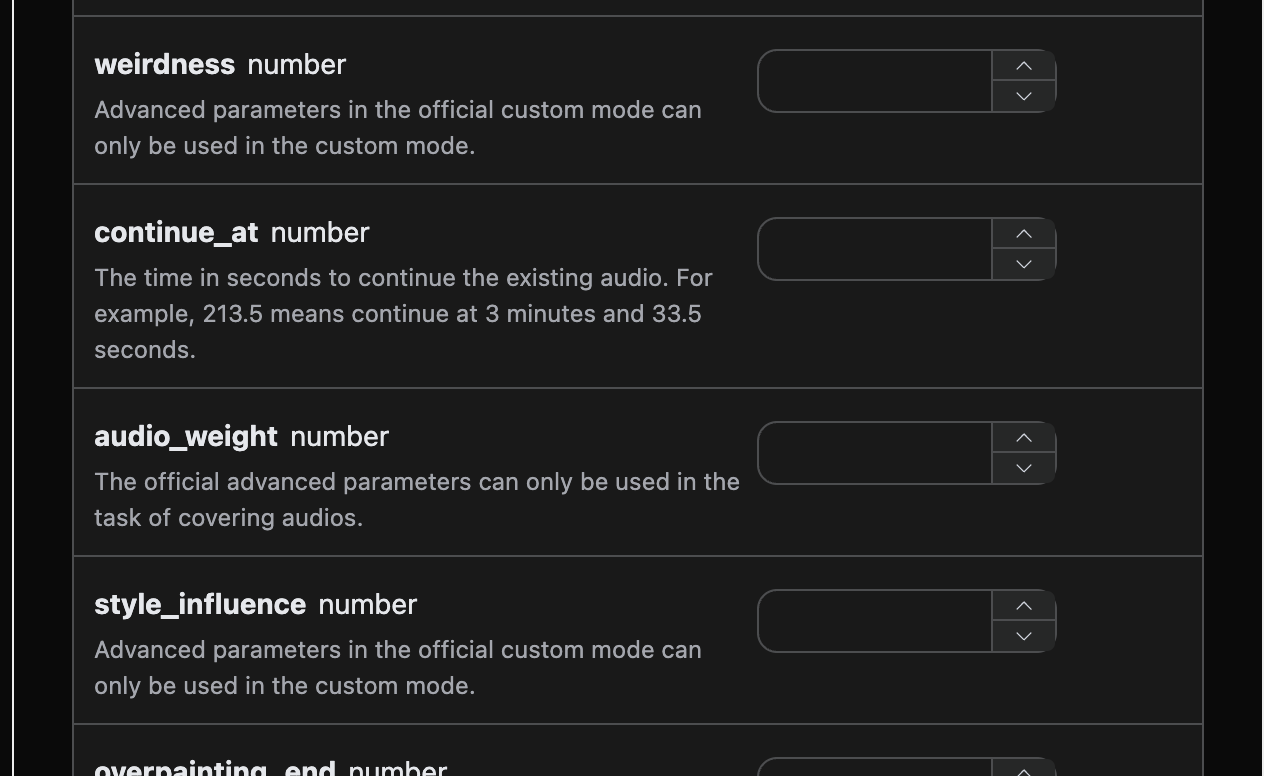
After completing the fields, the following code is automatically generated:
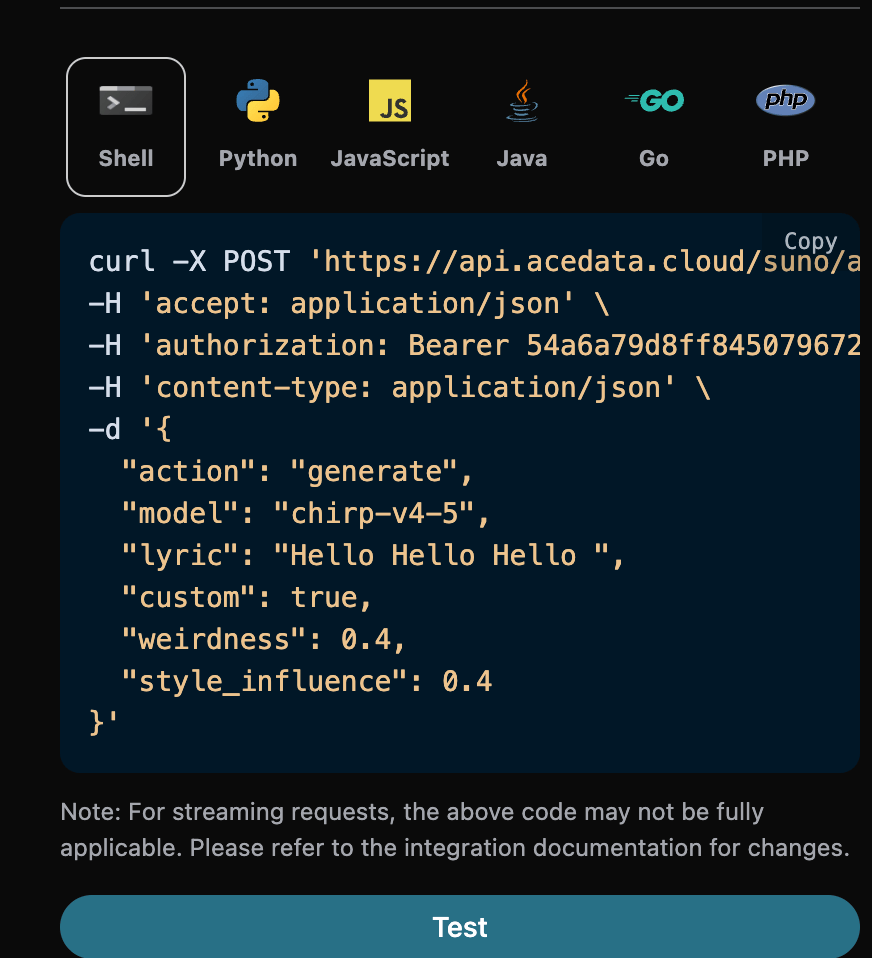
Corresponding Python code:
import requests

url = "https://api.ezhou.art/suno/audios"

headers = {
    "accept": "application/json",
    "authorization": "Bearer {token}",
    "content-type": "application/json"
}

payload = {
    "action": "generate",
    "model": "chirp-v4-5",
    "lyric": "Hello Hello Hello ",
    "custom": True,
    "weirdness": 0.4,
    "style_influence": 0.4,
    "audio_weight": 0.4
}

response = requests.post(url, json=payload, headers=headers)
print(response.text)
Click Run, and you can find that a result will be obtained, as follows:
{
  "success": true,
  "task_id": "2f3aa682-e1a7-43a9-9fbb-ed0ce8668a4b",
  "trace_id": "07408194-7deb-4a52-a36d-9a9a13143b5f",
  "data": [
    {
      "id": "c66e2077-7580-43f2-9937-c67a8afcd8bd",
      "title": "",
      "image_url": "https://cdn.acedata.cloud/e724d7f13d.png?example=image-039",
      "lyric": "Hello Hello Hello ",
      "audio_url": "https://cdn.acedata.cloud/assets/examples/fish/5ade0339-5f11-487e-aacc-06a908271706-8e3fcb0e5547.mp3",
      "video_url": "",
      "created_at": "2025-07-10T12:54:35.199Z",
      "model": "chirp-auk",
      "state": "succeeded",
      "style": "",
      "duration": 187.92
    },
    {
      "id": "a922f97b-307c-4c4d-aae3-a47ba8202a10",
      "title": "",
      "image_url": "https://cdn.acedata.cloud/e724d7f13d.png?example=image-040",
      "lyric": "Hello Hello Hello ",
      "audio_url": "https://cdn.acedata.cloud/assets/examples/fish/5ade0339-5f11-487e-aacc-06a908271706-8e3fcb0e5547.mp3",
      "video_url": "",
      "created_at": "2025-07-10T12:54:35.199Z",
      "model": "chirp-auk",
      "state": "succeeded",
      "style": "",
      "duration": 229.64
    }
  ]
}
In this way, advanced parameters are used to generate custom songs, and the result is similar to the above.
¶ Controlling Song Duration
By default, the duration of a generated song is determined by the model itself, usually between 30 seconds and 4 minutes. If a longer or shorter final product is needed, the desired duration can be specified through the duration parameter, in seconds, with an integer value between 10 and 360.
This parameter is used for song generation in custom mode (custom is true). It should be particularly noted that duration is a preference hint, not a hard constraint: the model will refer to this value when creating, but it does not guarantee reaching it. In actual testing, the actual duration is usually significantly shorter than the desired value, and the durations of the two songs returned by the same request may also differ by several times. Even for exactly the same request, the durations obtained from multiple submissions may vary greatly. Therefore, do not use it as precise duration control. If a fixed duration is required for business purposes, please trim it yourself or retry after obtaining the final product.
Corresponding Python code:
import requests

url = "https://api.ezhou.art/suno/audios"

headers = {
    "accept": "application/json",
    "authorization": "Bearer {token}",
    "content-type": "application/json"
}

payload = {
    "action": "generate",
    "model": "chirp-v5-5",
    "custom": True,
    "title": "Under the City Lights",
    "style": "lo-fi piano",
    "lyric": "[Verse]\nSunrise creepin\nGold on the floor\n[Chorus]\nUnder the city lights\n",
    "duration": 330
}

response = requests.post(url, json=payload, headers=headers)
print(response.text)
It should be noted that the duration in the request is the desired duration, while the duration field of each song in the response data is the actual duration of that song. They have the same name but different meanings, and the actual duration is not guaranteed to equal the desired value. Lyric length is one of the main factors affecting the duration of the final product. If a longer final product is needed, it is recommended to also provide more complete lyrics.
The API validates that duration must be an integer from 10 to 360; it is still only a generation target, not a guarantee of the final product length.
¶ Add Instrumental Feature
In August 2025, Suno launched the Add Insterumental feature. First, you need to upload a song with only vocals and no accompaniment, so that Suno can add music for you. First, you can go to Suno Upload API to upload a song with only vocals and no accompaniment. The corresponding operation is shown in the figure below:
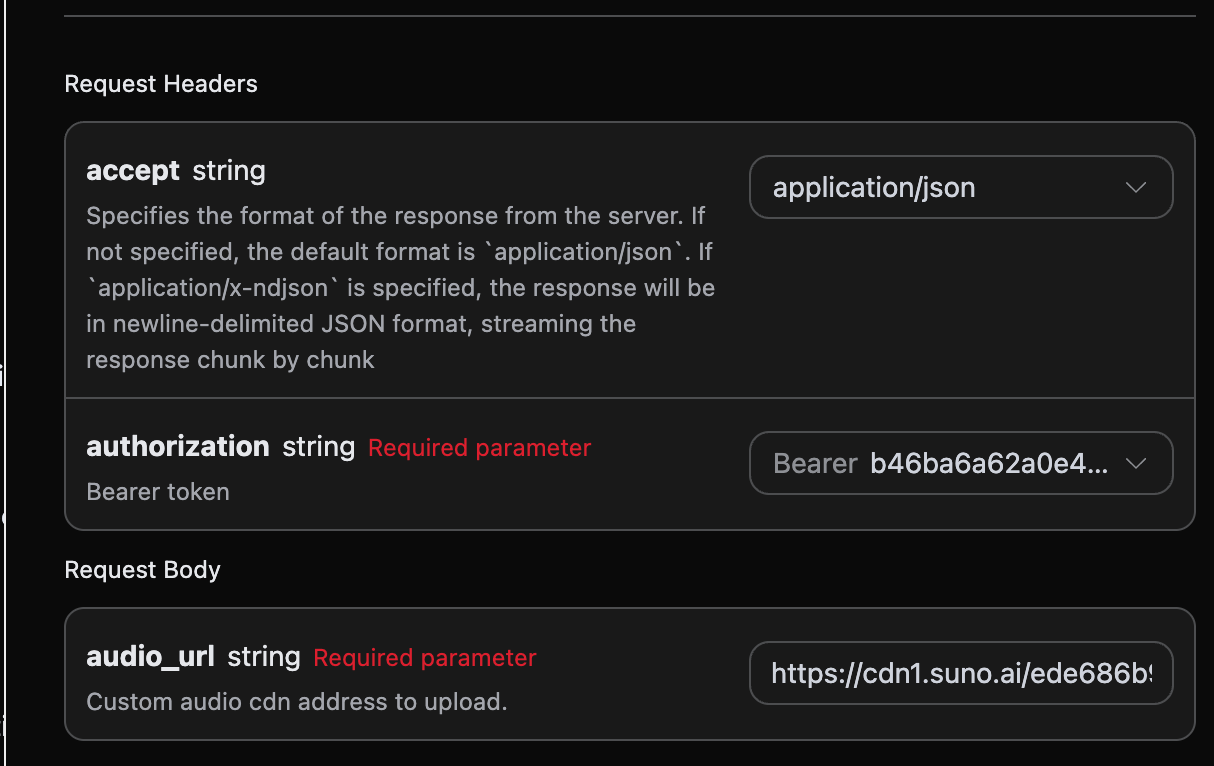
Then you need to record the uploaded audio_id. The specific result is shown in the figure below:
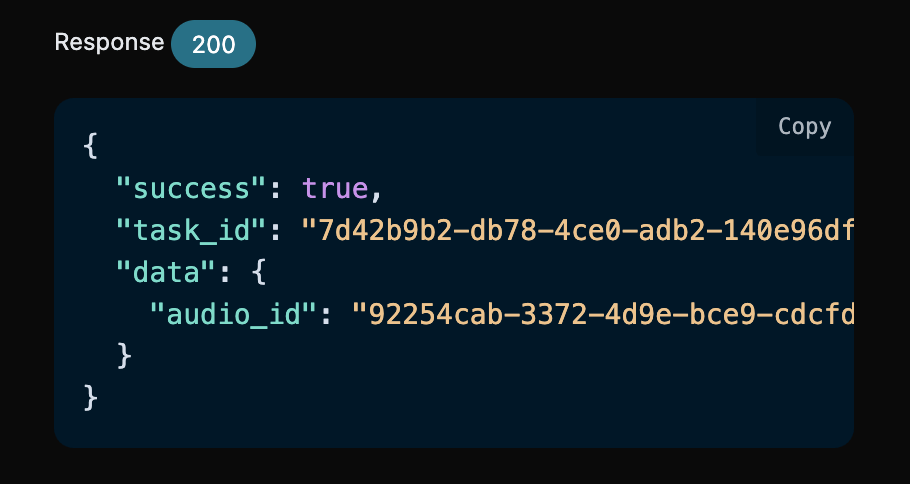
Finally, an audio_id is obtained: 92254cab-3372-4d9e-bce9-cdcfdbc39070. Then we also need to fill in the following parameters:
- action: The content is
underpainting. - underpainting_start: The start time for adding accompaniment to the uploaded song. The default value is 0.
- underpainting_end: The end time for adding accompaniment to the uploaded song. It must be less than the total duration of the song.
- audio_id: The ID of the uploaded song with only vocals and no accompaniment.
- style: The style of the accompaniment. It is best not to use lyrics since it is accompaniment.
After filling it out, the following code is automatically generated:
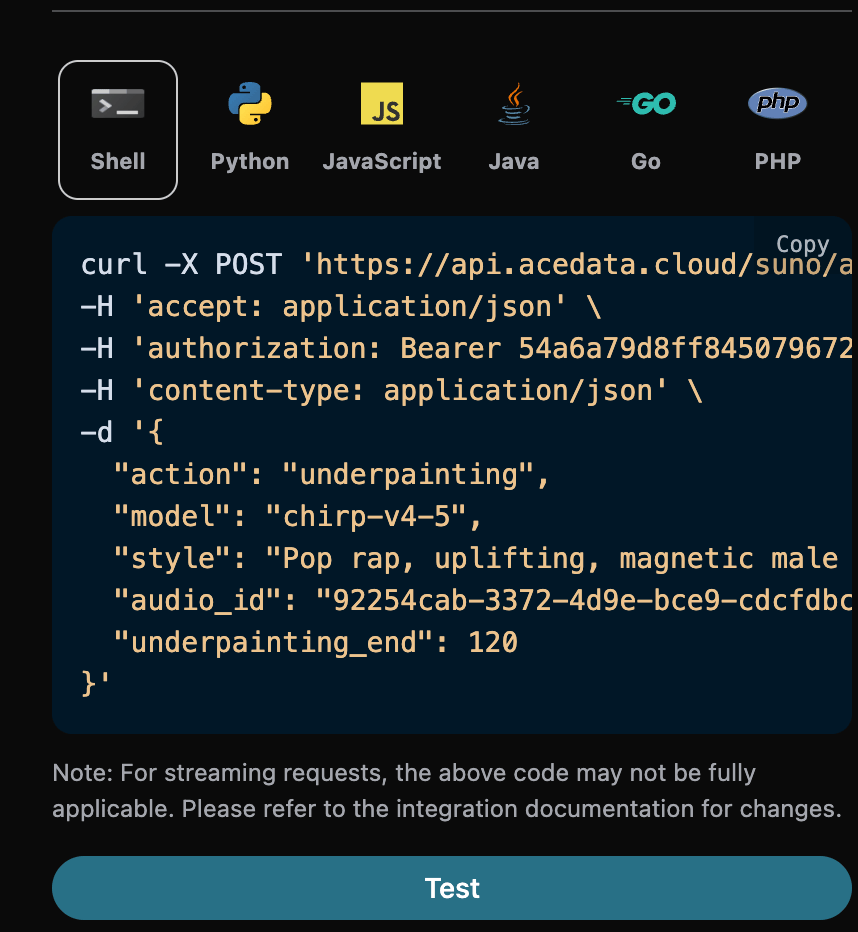
The corresponding Python code:
import requests

url = "https://api.ezhou.art/suno/audios"

headers = {
    "accept": "application/json",
    "authorization": "Bearer {token}",
    "content-type": "application/json"
}

payload = {
    "action": "underpainting",
    "model": "chirp-v4-5",
    "style": "Pop rap, uplifting, magnetic male vocals, piano, synth, electric guitar, driving bass, clear structure",
    "audio_id": "92254cab-3372-4d9e-bce9-cdcfdbc39070",
    "underpainting_end": 120
}

response = requests.post(url, json=payload, headers=headers)
print(response.text)
Click Run, and you can find that you will get a result as follows:
{
  "success": true,
  "task_id": "822d2e14-c535-4d48-a4e5-1b6ab00b04a7",
  "trace_id": "257eac2c-8e4f-44d0-8454-5e215111eefa",
  "data": [
    {
      "id": "2788cd21-bd84-422d-beb5-859c60fbf5b6",
      "title": "",
      "image_url": "https://cdn.acedata.cloud/e724d7f13d.png?example=image-041",
      "lyric": "",
      "audio_url": "https://cdn.acedata.cloud/assets/examples/fish/5ade0339-5f11-487e-aacc-06a908271706-8e3fcb0e5547.mp3",
      "video_url": "",
      "created_at": "2025-08-27T15:25:42.548Z",
      "model": "chirp-v4",
      "state": "succeeded",
      "style": "Pop rap, uplifting, magnetic male vocals, piano, synth, electric guitar, driving bass, clear structure",
      "duration": 10.16
    },
    {
      "id": "a4bb7220-e971-4cbf-a626-b86c648bcf55",
      "title": "",
      "image_url": "https://cdn.acedata.cloud/e724d7f13d.png?example=image-042",
      "lyric": "",
      "audio_url": "https://cdn.acedata.cloud/assets/examples/fish/5ade0339-5f11-487e-aacc-06a908271706-8e3fcb0e5547.mp3",
      "video_url": "",
      "created_at": "2025-08-27T15:25:42.548Z",
      "model": "chirp-v4",
      "state": "succeeded",
      "style": "Pop rap, uplifting, magnetic male vocals, piano, synth, electric guitar, driving bass, clear structure",
      "duration": 2.52
    }
  ]
}
In this way, the operation of adding accompaniment to the uploaded song with only vocals and no accompaniment is completed, and the result is similar to the above.
¶ Add Vocals Feature
In August 2025, Suno launched the Add Vocals feature. First, you need to upload a pure instrumental track, so that Suno can write lyrics and generate vocal singing. First, you can go to Suno Upload API to upload a song with only vocals and no accompaniment. The corresponding operation is shown in the figure below:
Then you need to record the uploaded audio_id. The specific result is shown in the figure below:
Finally, an audio_id is obtained: 92254cab-3372-4d9e-bce9-cdcfdbc39070. Then we also need to fill in the following parameters:
- action: The content is
overpainting. - overpainting_start: The start time for adding vocals to the uploaded song. The default value is 0.
- overpainting_end: The end time for adding vocals to the uploaded song. It must be less than the total duration of the song.
- audio_id: The ID of the uploaded song with only vocals and no accompaniment.
- custom: Custom mode must be used to enter lyrics in this mode.
- lyric: The lyrics entered in custom mode.
- style: The style of the accompaniment.
After filling it out, the following code is automatically generated:
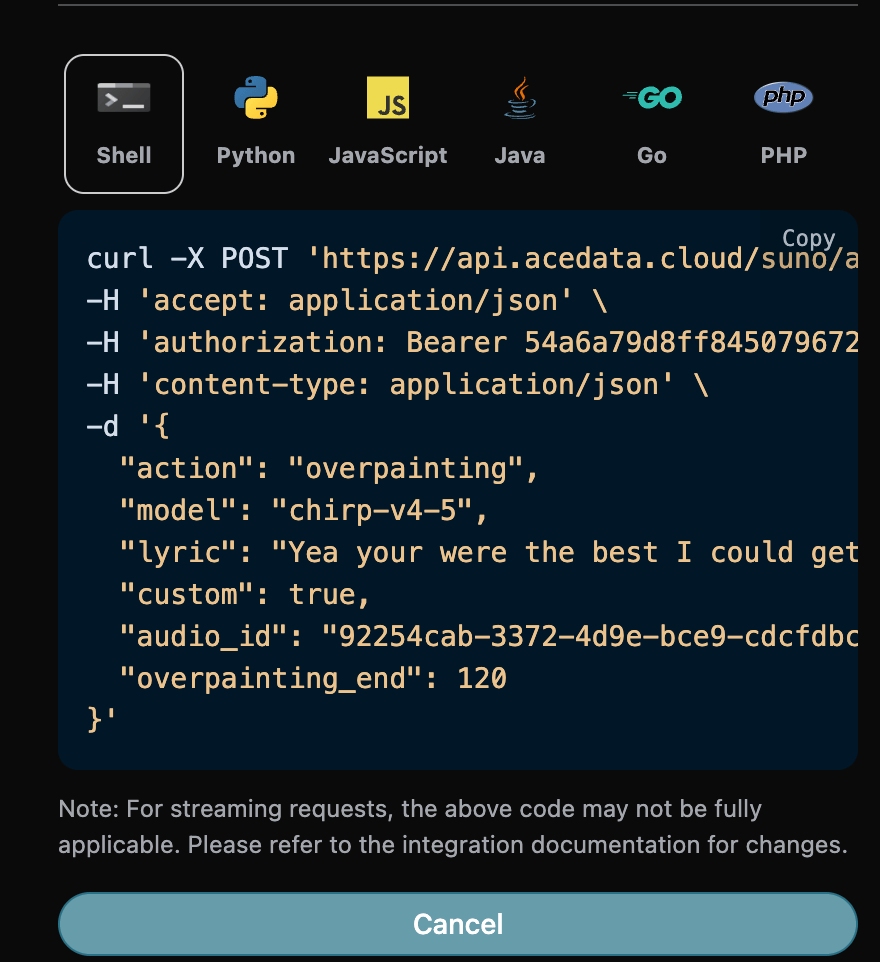
The corresponding Python code:
import requests

url = "https://api.ezhou.art/suno/audios"

headers = {
    "accept": "application/json",
    "authorization": "Bearer {token}",
    "content-type": "application/json"
}

payload = {
    "action": "overpainting",
    "model": "chirp-v4-5",
    "lyric": "Yea your were the best I could get \\nBut I knew that it couldn’t last \\nStayed down since we were friends \\nHad to leave those thoughts in the past \\nMade like 40k just last week \\nOn top of the 20 with my babe\\ndon’t care for what niggas say",
    "custom": True,
    "audio_id": "92254cab-3372-4d9e-bce9-cdcfdbc39070",
    "overpainting_end": 120
}

response = requests.post(url, json=payload, headers=headers)
print(response.text)
Click Run, and you can find that you will get a result as follows:
{
  "success": true,
  "task_id": "31bb250e-6614-49ec-ac85-631f224daeba",
  "trace_id": "efe8e7f3-9a65-4f13-a9f8-51e8478899df",
  "data": [
    {
      "id": "a597f945-64df-4722-a631-d436450832bd",
      "title": "",
      "image_url": "https://cdn.acedata.cloud/e724d7f13d.png?example=image-043",
      "lyric": "Yea your were the best I could get \\nBut I knew that it couldn’t last \\nStayed down since we were friends \\nHad to leave those thoughts in the past \\nMade like 40k just last week \\nOn top of the 20 with my babe\\ndon’t care for what niggas say",
      "audio_url": "https://cdn.acedata.cloud/assets/examples/fish/5ade0339-5f11-487e-aacc-06a908271706-8e3fcb0e5547.mp3",
      "video_url": "",
      "created_at": "2025-08-27T15:33:51.550Z",
      "model": "chirp-v4",
      "state": "succeeded",
      "style": "",
      "duration": 105.32
    },
    {
      "id": "b41a8b91-3d88-4ebd-a6cf-732764b24954",
      "title": "",
      "image_url": "https://cdn.acedata.cloud/e724d7f13d.png?example=image-044",
      "lyric": "Yea your were the best I could get \\nBut I knew that it couldn’t last \\nStayed down since we were friends \\nHad to leave those thoughts in the past \\nMade like 40k just last week \\nOn top of the 20 with my babe\\ndon’t care for what niggas say",
      "audio_url": "https://cdn.acedata.cloud/assets/examples/fish/5ade0339-5f11-487e-aacc-06a908271706-8e3fcb0e5547.mp3",
      "video_url": "",
      "created_at": "2025-08-27T15:33:51.550Z",
      "model": "chirp-v4",
      "state": "succeeded",
      "style": "",
      "duration": 148.16
    }
  ]
}
This completes the operation of adding vocals to the uploaded a cappella song without vocals, and the result is similar to the above.
¶ Remaster Feature
In December 2025, Suno introduced the new Remaster feature. This feature can regenerate songs and cannot be used across accounts. Then we also need to fill in the following parameters:
- action: The content is
remaster. - audio_id: The ID of the song that needs to be regenerated.
- model: Only v4.5+ and v5 are supported.
- variation_category: Only supported in v5 and above, and has only 3 values: high, normal, subtle.
After filling it out, the following code is automatically generated:
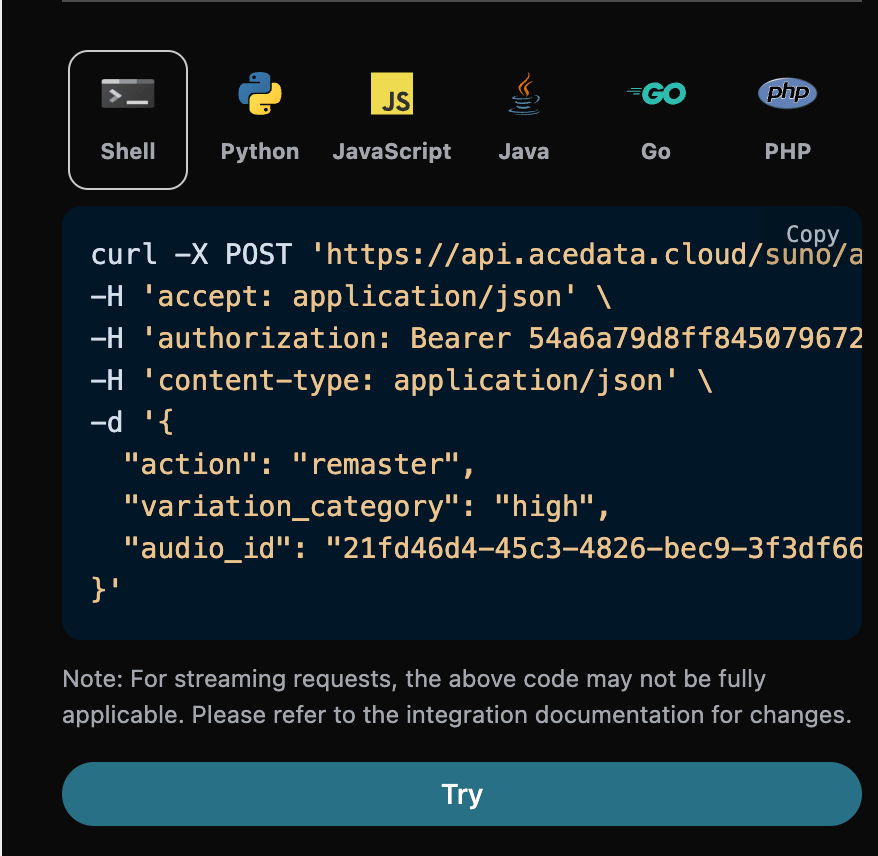
The corresponding Python code:
import requests

url = "https://api.ezhou.art/suno/audios"

headers = {
    "accept": "application/json",
    "authorization": "Bearer {token}",
    "content-type": "application/json"
}

payload = {
    "action": "remaster",
    "variation_category": "high",
    "audio_id": "21fd46d4-45c3-4826-bec9-3f3df667902e"
}

response = requests.post(url, json=payload, headers=headers)
print(response.text)
Click Run, and you can find that you will get a result, as follows:
{
  "success": true,
  "task_id": "791ee74c-9363-4352-afe7-babb19b89899",
  "trace_id": "77acda57-c3d4-4e11-a506-4f50e0609916",
  "data": [
    {
      "id": "b0515cdf-9cb5-46cd-b0fe-10a239dc9274",
      "title": "Navidad en costura  (Remastered)",
      "image_url": "https://cdn.acedata.cloud/e724d7f13d.png?example=image-045",
      "image_large_url": "https://cdn.acedata.cloud/e724d7f13d.png?example=image-046",
      "lyric": "En Teror las clases siguen,\nni en Navidad hay parón;\ncose el grupo entre villancicos\ny un buen trocito de turrón.\nLa Popular abre sus puertas,\ny el taller suena mejor;\nhilo, aguja y canto alegre\nlo pasaremos mejor\nSeguimos en las costuras,\ncon música y diversión;\nlos alumnos comeremos\nGolosinas un montón ",
      "audio_url": "https://cdn.acedata.cloud/assets/examples/fish/5ade0339-5f11-487e-aacc-06a908271706-8e3fcb0e5547.mp3",
      "video_url": "",
      "created_at": "2025-12-04T13:09:59.936Z",
      "model": "chirp-v4",
      "state": "succeeded",
      "style": "Villancico",
      "duration": 32.2
    },
    {
      "id": "06edab94-a4f9-4c0c-abac-a2e8a97c76a8",
      "title": "Navidad en costura  (Remastered)",
      "image_url": "https://cdn.acedata.cloud/e724d7f13d.png?example=image-047",
      "image_large_url": "https://cdn.acedata.cloud/e724d7f13d.png?example=image-048",
      "lyric": "En Teror las clases siguen,\nni en Navidad hay parón;\ncose el grupo entre villancicos\ny un buen trocito de turrón.\nLa Popular abre sus puertas,\ny el taller suena mejor;\nhilo, aguja y canto alegre\nlo pasaremos mejor\nSeguimos en las costuras,\ncon música y diversión;\nlos alumnos comeremos\nGolosinas un montón ",
      "audio_url": "https://cdn.acedata.cloud/assets/examples/fish/5ade0339-5f11-487e-aacc-06a908271706-8e3fcb0e5547.mp3",
      "video_url": "",
      "created_at": "2025-12-04T13:09:59.936Z",
      "model": "chirp-v4",
      "state": "succeeded",
      "style": "Villancico",
      "duration": 32.2
    }
  ]
}
This completes the operation of regenerating an already generated song, and the result is similar to the above.
¶ Mashup Song Generation Feature
In December 2025, Suno introduced the new Mashup feature. This feature can generate a song based on two reference songs. Then we also need to fill in the following parameters:
- action: The content is
mashup. - mashup_audio_ids: The IDs of the two reference songs.
After filling it out, the following code is automatically generated:
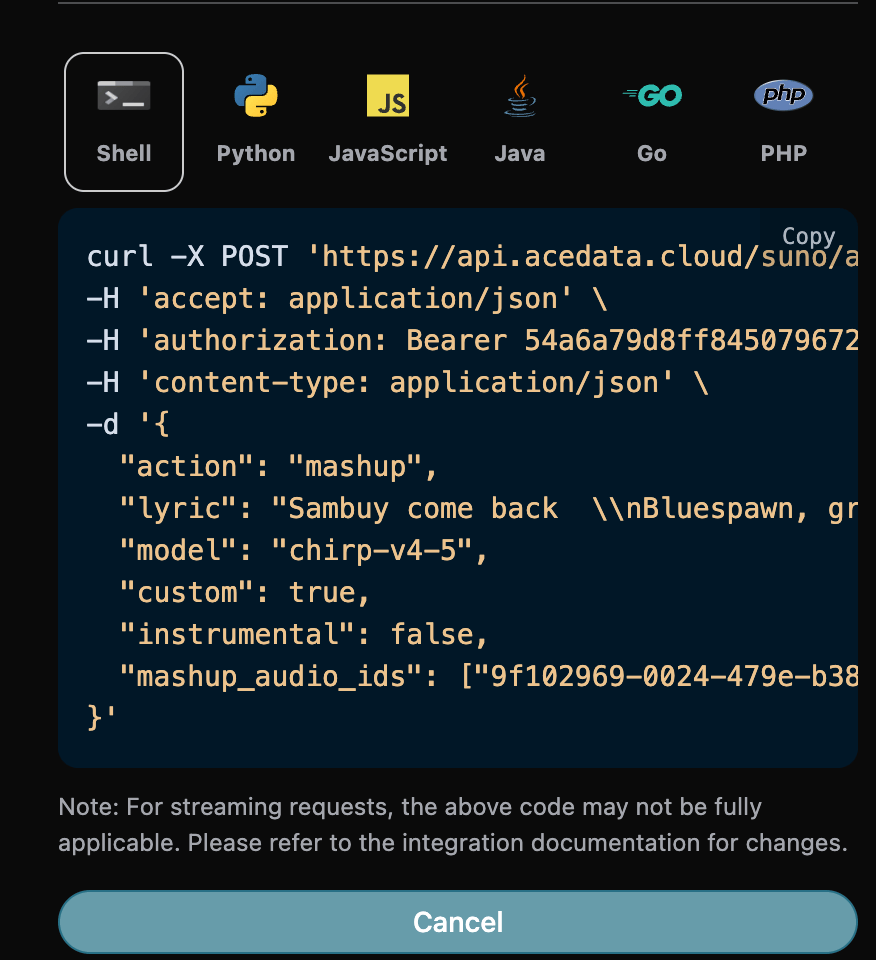
The corresponding Python code:
import requests

url = "https://api.ezhou.art/suno/audios"

headers = {
    "accept": "application/json",
    "authorization": "Bearer {token}",
    "content-type": "application/json"
}

payload = {
    "action": "mashup",
    "lyric": "Sambuy come back  \\nBluespawn, greenspawn are making you a spawn  \\n\\nSambuy come  \\nSambuy come back  \\nBluespawn, greenspawn are making you a spawn  \\n\\nSambuy come  \\nSambuy come back  \\nBluespawn, greenspawn are making you a spawn  \\n\\nSambuy come  \\nSambuy come back  \\nSambuy come, Sambuy come back  \\nBluespawn, greenspawn are making you a spawn  \\n\\nSambuy come  \\nSambuy come back  \\nBluespawn, greenspawn are making you a spawn  \\nSambuy come back",
    "model": "chirp-v4-5",
    "custom": True,
    "instrumental": False,
    "mashup_audio_ids": ["9f102969-0024-479e-b38f-c0c5db21383d","6aebb715-701c-433f-b976-a7ff5cf16255"]
}

response = requests.post(url, json=payload, headers=headers)
print(response.text)
Click Run, and you can see that a result will be returned, as follows:
{
  "success": true,
  "task_id": "3fe070eb-2ab1-4424-909c-acfe3ca761af",
  "trace_id": "2b220382-7a84-4853-ae43-05cdcad233a9",
  "data": [
    {
      "id": "5ff751dc-0e72-4de9-a54b-2cad50984b47",
      "title": "",
      "image_url": "https://cdn.acedata.cloud/e724d7f13d.png?example=image-049",
      "image_large_url": "https://cdn.acedata.cloud/e724d7f13d.png?example=image-050",
      "lyric": "Sambuy come back  \\nBluespawn, greenspawn are making you a spawn  \\n\\nSambuy come  \\nSambuy come back  \\nBluespawn, greenspawn are making you a spawn  \\n\\nSambuy come  \\nSambuy come back  \\nBluespawn, greenspawn are making you a spawn  \\n\\nSambuy come  \\nSambuy come back  \\nSambuy come, Sambuy come back  \\nBluespawn, greenspawn are making you a spawn  \\n\\nSambuy come  \\nSambuy come back  \\nBluespawn, greenspawn are making you a spawn  \\nSambuy come back",
      "audio_url": "https://cdn.acedata.cloud/assets/examples/fish/5ade0339-5f11-487e-aacc-06a908271706-8e3fcb0e5547.mp3",
      "video_url": "",
      "created_at": "2026-01-25T15:13:30.181Z",
      "model": "chirp-v4-5",
      "state": "succeeded",
      "style": "",
      "duration": 219.08
    },
    {
      "id": "19c515c4-d7b3-4a17-8ab0-dd1ebd4861b8",
      "title": "",
      "image_url": "https://cdn.acedata.cloud/e724d7f13d.png?example=image-051",
      "image_large_url": "https://cdn.acedata.cloud/e724d7f13d.png?example=image-052",
      "lyric": "Sambuy come back  \\nBluespawn, greenspawn are making you a spawn  \\n\\nSambuy come  \\nSambuy come back  \\nBluespawn, greenspawn are making you a spawn  \\n\\nSambuy come  \\nSambuy come back  \\nBluespawn, greenspawn are making you a spawn  \\n\\nSambuy come  \\nSambuy come back  \\nSambuy come, Sambuy come back  \\nBluespawn, greenspawn are making you a spawn  \\n\\nSambuy come  \\nSambuy come back  \\nBluespawn, greenspawn are making you a spawn  \\nSambuy come back",
      "audio_url": "https://cdn.acedata.cloud/assets/examples/fish/5ade0339-5f11-487e-aacc-06a908271706-8e3fcb0e5547.mp3",
      "video_url": "",
      "created_at": "2026-01-25T15:13:30.181Z",
      "model": "chirp-v4-5",
      "state": "succeeded",
      "style": "",
      "duration": 163.12
    }
  ]
}
This completes the operation of generating a mashup based on reference songs, and the result is similar to the above.
¶ Samples: Generate Songs by Sampling
The samples here refers to single-audio segment sampling: select a start and end time from an existing audio track, and use that segment as sample material for creation. It differs from the Inspo inspiration creation feature below, which uses 1 to 4 complete reference audio tracks. The following parameters need to be filled in:
- action: The content is
samples. - samples_start: Sampling start time (seconds), defaults to 0 and must not be less than 0.
- samples_end: Sampling end time (seconds), required and must be greater than the start time.
- audio_id: The ID of the reference song to be sampled.
After filling them in, the code is automatically generated as follows:
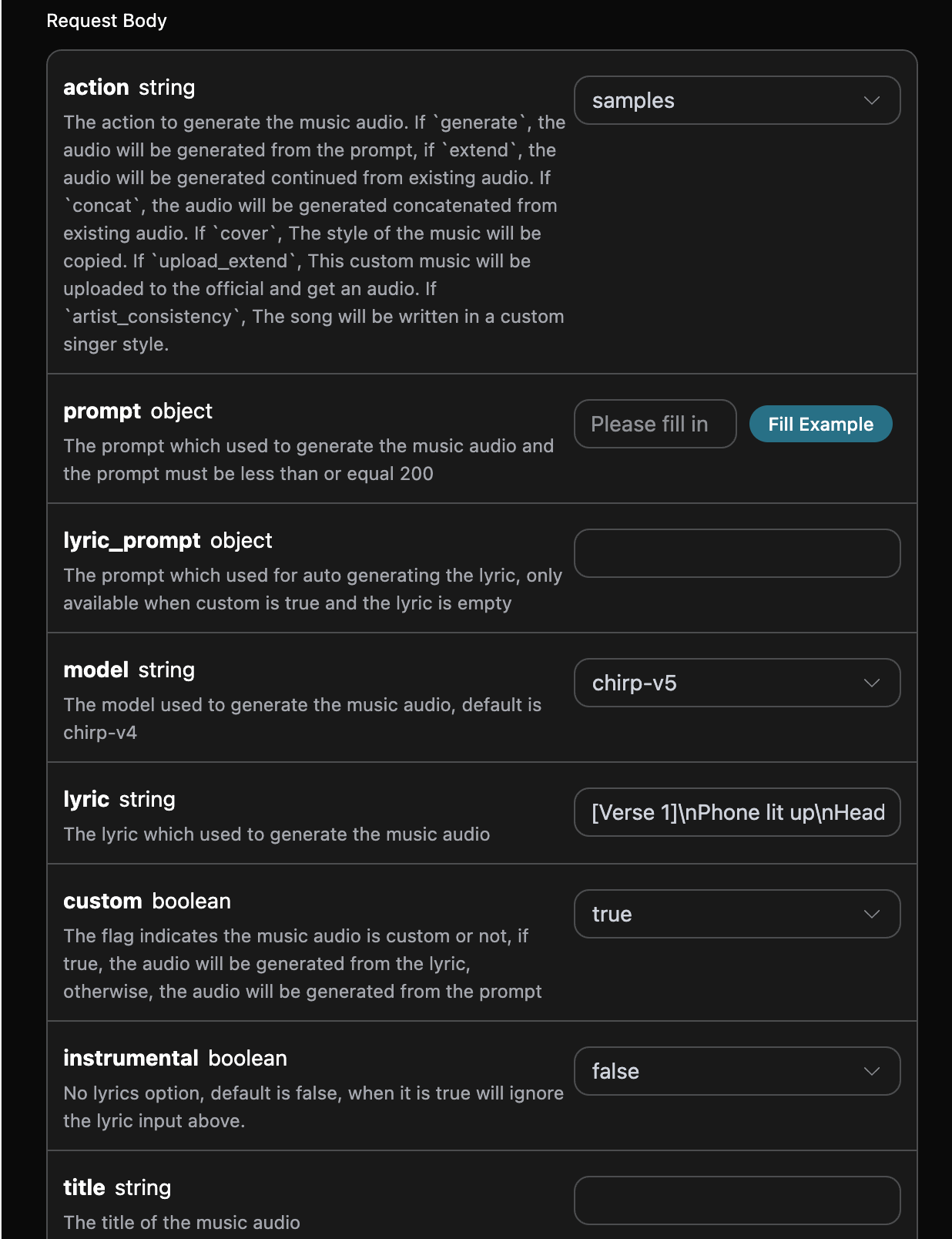
The corresponding Python code:
import requests

url = "https://api.ezhou.art/suno/audios"

headers = {
    "accept": "application/json",
    "authorization": "Bearer {token}",
    "content-type": "application/json"
}

payload = {
    "action": "samples",
    "model": "chirp-v5",
    "lyric": "[Verse 1]\\nPhone lit up\\nHeadline in my hand\\nFeels made up\\nStill says “you won’t understand”\\nYour name\\nMy name\\nSide by side in the scroll\\nCold black text\\nOn a story I used to hold\\n\\n[Chorus]\\nYou’re breaking news\\nAnd I’m just breaking\\nFront-page truth\\nHeart still shaking\\nEverybody reads\\nWhat we already knew\\nYou’re a story now\\nAnd I’m the one you broke it to\\n\\n[Verse 2]\\nNeighbors talk\\nThrough a half-closed door\\nCoffee cools\\nOn a cracked old floor\\nYour suitcase snaps\\nLike a camera flash\\nOne last quote\\nThen you cut to black\\n\\n[Chorus]\\nYou’re breaking news\\nAnd I’m just breaking\\nFront-page truth\\nHeart still shaking\\nEverybody reads\\nWhat we already knew\\nYou’re a story now\\nAnd I’m the one you broke it to\\n\\n[Bridge]\\nIs there a line\\nWhere we rewind\\nOr just a feed\\nThat leaves us behind\\nTell me\\nWho gets\\nThe final view\\nWhen I stop trending\\nWith you\\n\\n[Chorus]\\nYou’re breaking news\\nAnd I’m just breaking\\nFront-page truth\\nHeart still shaking\\nEverybody reads\\nWhat we already knew\\nYou’re a story now\\nAnd I’m the one you broke it to (yeah)",
    "custom": True,
    "instrumental": False,
    "audio_id": "0fa07665-6b8e-4a8b-8bd3-7e0cfcdada88",
    "samples_end": 102.16,
    "samples_start": 59.88
}

response = requests.post(url, json=payload, headers=headers)
print(response.text)
Click Run, and you can see that a result will be returned, as follows:
{
    "success": true,
    "task_id": "12135a45-6384-4683-9bb1-64f19933915a",
    "trace_id": "683e559d-340e-4c72-8fae-e683442ac7e9",
    "data": [
        {
            "id": "9a0b680f-a9ea-4a36-8695-8ea777ab6ee7",
            "title": "Whistle in the Wind",
            "image_url": "https://cdn.acedata.cloud/e724d7f13d.png?example=image-053",
            "image_large_url": "https://cdn.acedata.cloud/e724d7f13d.png?example=image-054",
            "lyric": "[Verse 1]\nPhone lit up\nHeadline in my hand\nFeels made up\nStill says “you won’t understand”\nYour name\nMy name\nSide by side in the scroll\nCold black text\nOn a story I used to hold\n[Chorus]\nYou’re breaking news\nAnd I’m just breaking\nFront-page truth\nHeart still shaking\nEverybody reads\nWhat we already knew\nYou’re a story now\nAnd I’m the one you broke it to\n[Verse 2]\nNeighbors talk\nThrough a half-closed door\nCoffee cools\nOn a cracked old floor\nYour suitcase snaps\nLike a camera flash\nOne last quote\nThen you cut to black\n[Chorus]\nYou’re breaking news\nAnd I’m just breaking\nFront-page truth\nHeart still shaking\nEverybody reads\nWhat we already knew\nYou’re a story now\nAnd I’m the one you broke it to\n[Bridge]\nIs there a line\nWhere we rewind\nOr just a feed\nThat leaves us behind\nTell me\nWho gets\nThe final view\nWhen I stop trending\nWith you\n[Chorus]\nYou’re breaking news\nAnd I’m just breaking\nFront-page truth\nHeart still shaking\nEverybody reads\nWhat we already knew\nYou’re a story now\nAnd I’m the one you broke it to (yeah)",
            "audio_url": "https://cdn.acedata.cloud/assets/examples/fish/5ade0339-5f11-487e-aacc-06a908271706-8e3fcb0e5547.mp3",
            "video_url": "",
            "created_at": "2026-01-31T14:34:45.043Z",
            "model": "chirp-v5",
            "state": "succeeded",
            "style": "acoustic with a hint of optimism,folk-pop,female vocals",
            "duration": 176.92
        },
        {
            "id": "66473dee-3aaf-43b2-80fd-76568b3abbb1",
            "title": "Whistle in the Wind",
            "image_url": "https://cdn.acedata.cloud/e724d7f13d.png?example=image-055",
            "image_large_url": "https://cdn.acedata.cloud/e724d7f13d.png?example=image-056",
            "lyric": "[Verse 1]\nPhone lit up\nHeadline in my hand\nFeels made up\nStill says “you won’t understand”\nYour name\nMy name\nSide by side in the scroll\nCold black text\nOn a story I used to hold\n[Chorus]\nYou’re breaking news\nAnd I’m just breaking\nFront-page truth\nHeart still shaking\nEverybody reads\nWhat we already knew\nYou’re a story now\nAnd I’m the one you broke it to\n[Verse 2]\nNeighbors talk\nThrough a half-closed door\nCoffee cools\nOn a cracked old floor\nYour suitcase snaps\nLike a camera flash\nOne last quote\nThen you cut to black\n[Chorus]\nYou’re breaking news\nAnd I’m just breaking\nFront-page truth\nHeart still shaking\nEverybody reads\nWhat we already knew\nYou’re a story now\nAnd I’m the one you broke it to\n[Bridge]\nIs there a line\nWhere we rewind\nOr just a feed\nThat leaves us behind\nTell me\nWho gets\nThe final view\nWhen I stop trending\nWith you\n[Chorus]\nYou’re breaking news\nAnd I’m just breaking\nFront-page truth\nHeart still shaking\nEverybody reads\nWhat we already knew\nYou’re a story now\nAnd I’m the one you broke it to (yeah)",
            "audio_url": "https://cdn.acedata.cloud/assets/examples/fish/5ade0339-5f11-487e-aacc-06a908271706-8e3fcb0e5547.mp3",
            "video_url": "",
            "created_at": "2026-01-31T14:34:45.043Z",
            "model": "chirp-v5",
            "state": "succeeded",
            "style": "acoustic with a hint of optimism,folk-pop,female vocals",
            "duration": 177.48
        }
    ]
}
This completes the operation of generating songs from samples, and the result is similar to the above.
¶ Inspo Inspiration Creation Feature
The Inspo inspiration creation feature can generate new music based on 1 to 4 complete reference audio clips, supporting dragging or uploading audio as an inspiration source. The API uses the existing inspo action: the client provides publicly accessible audio URLs, and the service automatically completes reference audio preparation and creation, without requiring the client to separately read lyrics, style, or duration and then assemble the request. It differs from the interval sampling above, and also differs from Cover, which replicates the style of the original song. The following parameters need to be filled in when using it:
- action: the content is
inspo. - audio_urls: a list of URLs for reference audio, requiring 1 to 4 publicly accessible audio addresses.
- model: the model to use;
chirp-v6is recommended. - prompt: lyrics or creative prompt words (optional).
- instrumental: when set to
true, it generates according to a pure instrumental music request and does not use lyrics. - persona_id: uses the specified voice on service channels that support this combination; the reference audio will be bound during the preparation stage to the resource environment required by that voice.
- lyric_prompt: when
custom=trueand nolyricis provided, it is used to automatically generate lyrics.
Note: The reference audio must be publicly accessible audio files. If the reference audio exactly matches a known recording in the platform's music library, Suno may reject generation due to copyright verification. It is recommended to use audio you own or audio generated by Suno as the inspiration source.
The corresponding Python code:
import requests

url = "https://api.ezhou.art/suno/audios"

headers = {
    "accept": "application/json",
    "authorization": "Bearer {token}",
    "content-type": "application/json"
}

payload = {
    "action": "inspo",
    "model": "chirp-v6",
    "audio_urls": [
        "https://cdn.acedata.cloud/uploads/a0bc051f-42c2-4a46-aeb4-582dcc884ad2"
    ],
    "prompt": "Rework these references as warm acoustic folk with soft vocals"
}

response = requests.post(url, json=payload, headers=headers)
print(response.text)
Below, a verified historical response snapshot is retained; the snapshot used chirp-v5 at the time, while the current request example recommends chirp-v6. The returned structure is consistent:
{
    "success": true,
    "task_id": "725e6b41-78d0-4adf-856c-05e81098c029",
    "trace_id": "8c2f0b3e-2f6a-4738-8b1d-c58068ca3dab",
    "data": [
        {
            "id": "20ca5628-86e0-4c32-8ae4-9f0c481e45f3",
            "title": "Inspo Demo",
            "image_url": "https://cdn.acedata.cloud/e724d7f13d.png?example=image-057",
            "lyric": "",
            "audio_url": "https://cdn.acedata.cloud/assets/examples/fish/5ade0339-5f11-487e-aacc-06a908271706-8e3fcb0e5547.mp3",
            "video_url": "",
            "created_at": "2026-06-18T13:01:53.910Z",
            "model": "chirp-v5",
            "state": "succeeded",
            "style": "acoustic, folk, warm",
            "duration": 36.92
        },
        {
            "id": "8744a796-9961-45af-868d-4f3bc1c44257",
            "title": "Inspo Demo",
            "image_url": "https://cdn.acedata.cloud/e724d7f13d.png?example=image-058",
            "lyric": "",
            "audio_url": "https://cdn.acedata.cloud/assets/examples/fish/5ade0339-5f11-487e-aacc-06a908271706-8e3fcb0e5547.mp3",
            "video_url": "",
            "created_at": "2026-06-18T13:01:53.910Z",
            "model": "chirp-v5",
            "state": "succeeded",
            "style": "acoustic, folk, warm",
            "duration": 84.16
        }
    ]
}
This completes the inspiration creation operation, and the returned result is consistent with regular song generation.
¶ Asynchronous Callback
Since Suno takes a relatively long time to generate music, approximately 1-2 minutes, if the API does not respond for a long time, the HTTP request will keep the connection open, resulting in additional system resource consumption, so this API also provides support for asynchronous callbacks.
The overall process is: when the client initiates a request, it additionally specifies a callback_url field. After the client initiates the API request, the API will immediately return a result containing a task_id field, representing the current task ID. When the task is completed, the result of the generated music will be sent in POST JSON format to the callback_url specified by the client, which also includes the task_id field, so the task results can be associated through the ID.
Next, let us understand the specific operation through an example.
First, the Webhook callback is a service that can receive HTTP requests. Developers should replace it with the URL of their own HTTP server. For convenience of demonstration, a public Webhook sample website https://webhook.site/ is used here. Open this website to obtain a Webhook URL, as shown in the figure:

Copy this URL, and it can be used as a Webhook. The example here is https://webhook.site/03e60575-3d96-4132-b681-b713d78116e2.
Next, we can set the callback_url field to the above Webhook URL and fill in prompt at the same time, as shown in the figure:
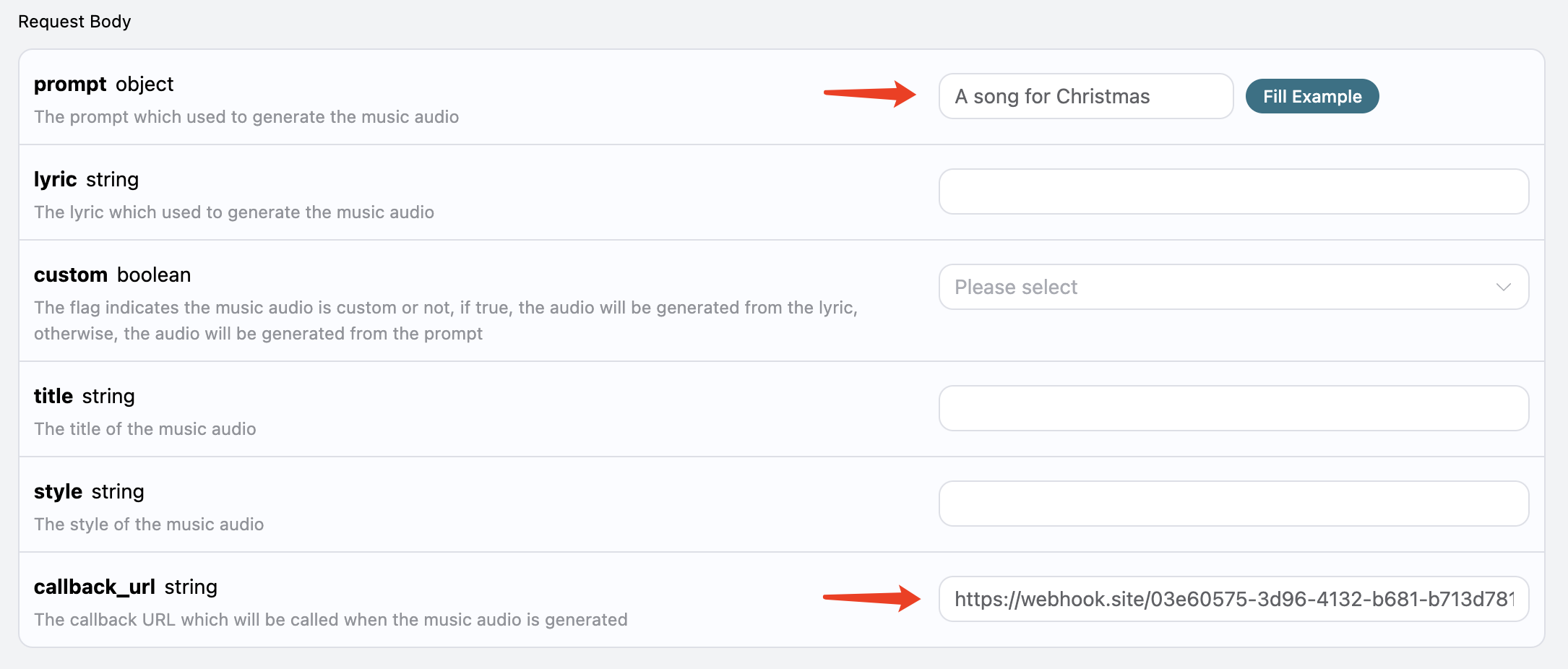
Click Run, and you can find that a result is returned immediately, as follows:
{
  "task_id": "44472ab8-783b-4054-b861-5bf14e462f60"
}
After waiting for a moment, we can observe the result of the generated song at https://webhook.site/03e60575-3d96-4132-b681-b713d78116e2, as shown in the figure:
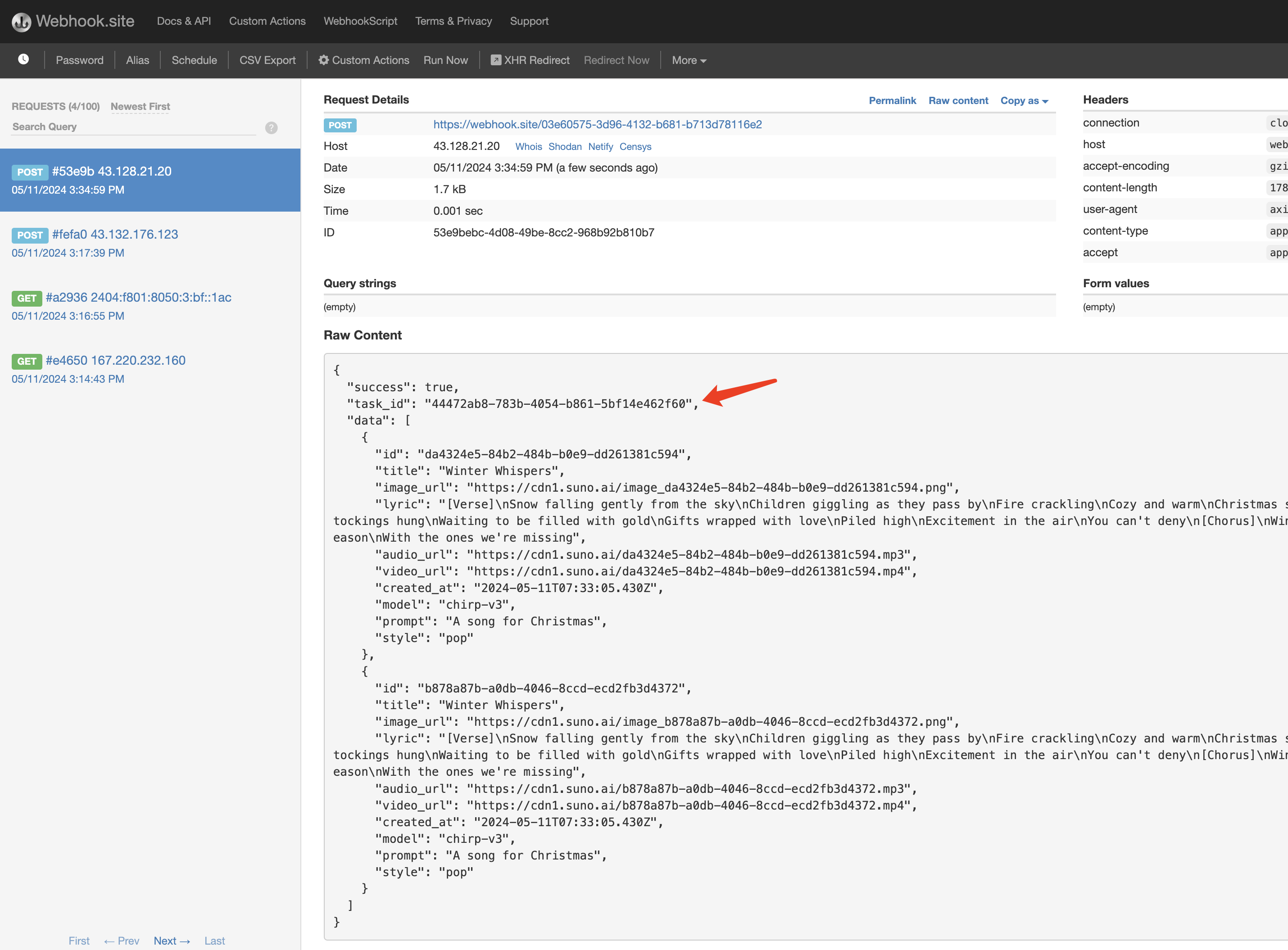
The content is as follows:
{
  "success": true,
  "task_id": "44472ab8-783b-4054-b861-5bf14e462f60",
  "data": [
    {
      "id": "da4324e5-84b2-484b-b0e9-dd261381c594",
      "title": "Winter Whispers",
      "image_url": "https://cdn.acedata.cloud/e724d7f13d.png?example=image-059",
      "lyric": "[Verse]\nSnow falling gently from the sky\nChildren giggling as they pass by\nFire crackling\nCozy and warm\nChristmas spirit begins to swarm\n[Verse 2]\nTwinkling lights\nA sight to behold\nStockings hung\nWaiting to be filled with gold\nGifts wrapped with love\nPiled high\nExcitement in the air\nYou can't deny\n[Chorus]\nWinter whispers in the wind\nJoy and love it brings\nLet's celebrate this season\nWith the ones we're missing",
      "audio_url": "https://cdn.acedata.cloud/assets/examples/fish/5ade0339-5f11-487e-aacc-06a908271706-8e3fcb0e5547.mp3",
      "video_url": "https://cdn.acedata.cloud/assets/examples/gemini/04a043bd-6b23-4b4e-945c-ce48158c3eee-3a89912507c7.mp4?example=video-003",
      "created_at": "2024-05-11T07:33:05.430Z",
      "model": "chirp-v3",
      "prompt": "A song for Christmas",
      "style": "pop"
    },
    {
      "id": "b878a87b-a0db-4046-8ccd-ecd2fb3d4372",
      "title": "Winter Whispers",
      "image_url": "https://cdn.acedata.cloud/e724d7f13d.png?example=image-060",
      "lyric": "[Verse]\nSnow falling gently from the sky\nChildren giggling as they pass by\nFire crackling\nCozy and warm\nChristmas spirit begins to swarm\n[Verse 2]\nTwinkling lights\nA sight to behold\nStockings hung\nWaiting to be filled with gold\nGifts wrapped with love\nPiled high\nExcitement in the air\nYou can't deny\n[Chorus]\nWinter whispers in the wind\nJoy and love it brings\nLet's celebrate this season\nWith the ones we're missing",
      "audio_url": "https://cdn.acedata.cloud/assets/examples/fish/5ade0339-5f11-487e-aacc-06a908271706-8e3fcb0e5547.mp3",
      "video_url": "https://cdn.acedata.cloud/assets/examples/gemini/04a043bd-6b23-4b4e-945c-ce48158c3eee-3a89912507c7.mp4?example=video-004",
      "created_at": "2024-05-11T07:33:05.430Z",
      "model": "chirp-v3",
      "prompt": "A song for Christmas",
      "style": "pop"
    }
  ]
}
You can see that there is a task_id field in the result. The other fields are similar to those above, and task association can be achieved through this field.
Of course, we can also obtain the result through streaming calls. We only need to set the value of accept in the request header to application/x-ndjson. Below, an example input is used for demonstration:
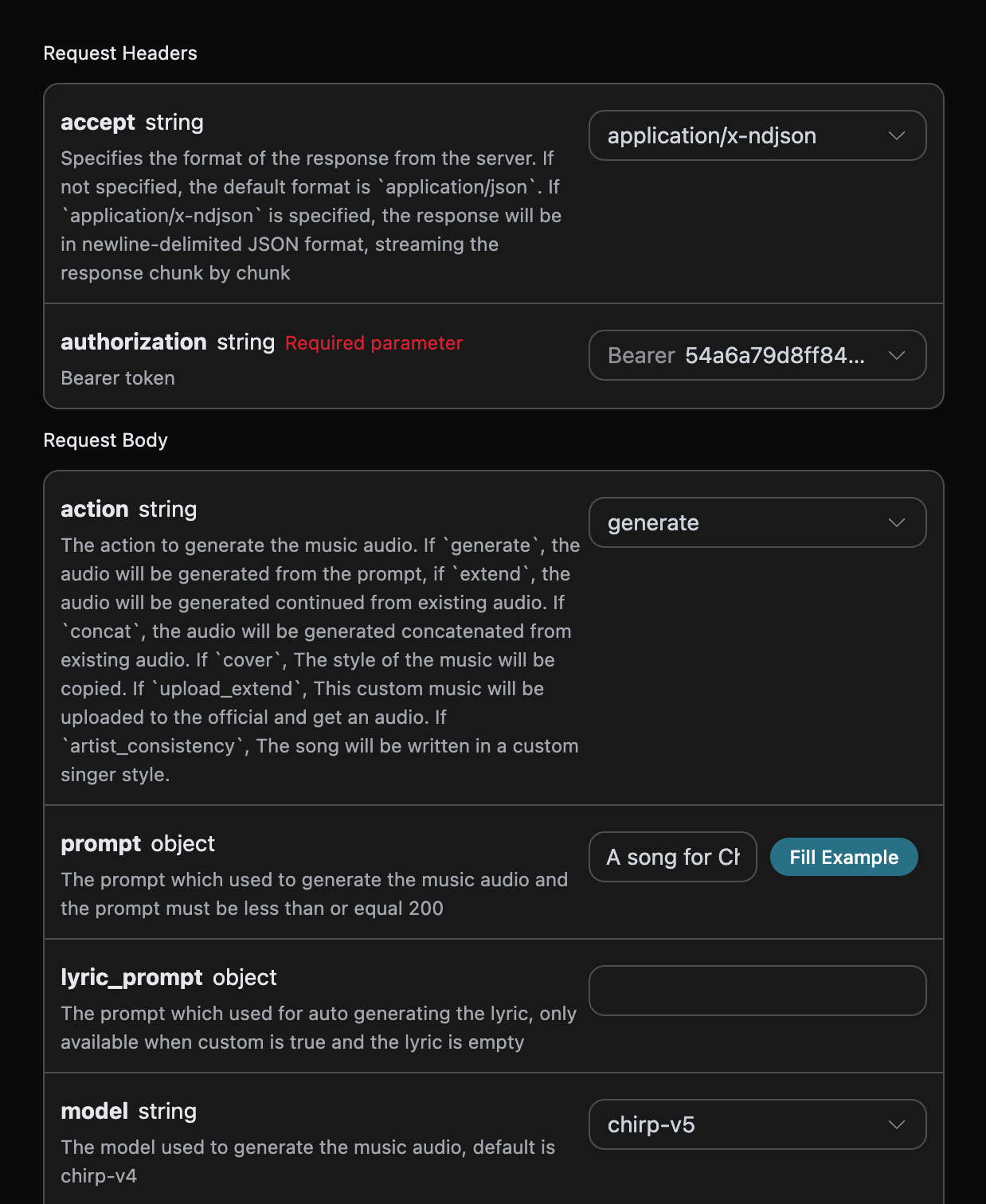
During the waiting process, we can obtain the following output:
{"success":true,"task_id":"1af4b454-ce84-4512-a0a2-de3f8574ecd8","data":[{"id":"1f610752-f426-4fd5-89a8-ba2ad0370881","title":"Snowflakes and Mistletoe","lyric":"[Verse]\nLights are tangled on the tree again\nThe cat’s knocked over the wreath\nCookies burning in the oven too\nBut I’m still grinning through my teeth\n[Prechorus]\nSnow is falling like glitter in the sky\nI’ve got a feeling this year’s gonna fly\n[Chorus]\nSnowflakes and mistletoe\nEverywhere I go\nI know\nLove is the gift\nThe glow\nSnowflakes and mistletoe\n[Verse 2]\nGrandma’s singing a little off-key\nThe kids are laughing too loud\nThe dog’s stolen a turkey leg\nChaos is a Christmas crowd\n[Prechorus]\nBut the fire’s crackling\nWarm and bright\nAnd my heart’s a candle tonight\n[Chorus]\nSnowflakes and mistletoe\nEverywhere I go\nI know\nLove is the gift\nThe glow\nSnowflakes and mistletoe","audio_url":"","video_url":"","created_at":"2025-12-13T11:29:25.101Z","model":"chirp-v5","state":"pending","prompt":"A song for Christmas","style":"uplifting, orchestral with bells and acoustic guitar"},{"id":"d1a3109d-799b-401e-b032-4b501bcf26f3","title":"Snowflakes and Mistletoe","lyric":"[Verse]\nLights are tangled on the tree again\nThe cat’s knocked over the wreath\nCookies burning in the oven too\nBut I’m still grinning through my teeth\n[Prechorus]\nSnow is falling like glitter in the sky\nI’ve got a feeling this year’s gonna fly\n[Chorus]\nSnowflakes and mistletoe\nEverywhere I go\nI know\nLove is the gift\nThe glow\nSnowflakes and mistletoe\n[Verse 2]\nGrandma’s singing a little off-key\nThe kids are laughing too loud\nThe dog’s stolen a turkey leg\nChaos is a Christmas crowd\n[Prechorus]\nBut the fire’s crackling\nWarm and bright\nAnd my heart’s a candle tonight\n[Chorus]\nSnowflakes and mistletoe\nEverywhere I go\nI know\nLove is the gift\nThe glow\nSnowflakes and mistletoe","audio_url":"","video_url":"","created_at":"2025-12-13T11:29:25.101Z","model":"chirp-v5","state":"pending","prompt":"A song for Christmas","style":"uplifting, orchestral with bells and acoustic guitar"}]}
{"success":true,"task_id":"1af4b454-ce84-4512-a0a2-de3f8574ecd8","trace_id":"4440342a-41c4-4140-8bb1-3537a598ca2e","data":[{"id":"1f610752-f426-4fd5-89a8-ba2ad0370881","title":"Snowflakes and Mistletoe","image_url": "https://cdn.acedata.cloud/e724d7f13d.png?example=image-073","image_large_url": "https://cdn.acedata.cloud/e724d7f13d.png?example=image-074","lyric":"[Verse]\nLights are tangled on the tree again\nThe cat’s knocked over the wreath\nCookies burning in the oven too\nBut I’m still grinning through my teeth\n[Prechorus]\nSnow is falling like glitter in the sky\nI’ve got a feeling this year’s gonna fly\n[Chorus]\nSnowflakes and mistletoe\nEverywhere I go\nI know\nLove is the gift\nThe glow\nSnowflakes and mistletoe\n[Verse 2]\nGrandma’s singing a little off-key\nThe kids are laughing too loud\nThe dog’s stolen a turkey leg\nChaos is a Christmas crowd\n[Prechorus]\nBut the fire’s crackling\nWarm and bright\nAnd my heart’s a candle tonight\n[Chorus]\nSnowflakes and mistletoe\nEverywhere I go\nI know\nLove is the gift\nThe glow\nSnowflakes and mistletoe","audio_url":"https://cdn.acedata.cloud/assets/examples/fish/5ade0339-5f11-487e-aacc-06a908271706-8e3fcb0e5547.mp3","video_url":"","created_at":"2025-12-13T11:29:25.101Z","model":"chirp-v5","state":"succeeded","prompt":"A song for Christmas","style":"uplifting, orchestral with bells and acoustic guitar","duration":129.92},{"id":"d1a3109d-799b-401e-b032-4b501bcf26f3","title":"Snowflakes and Mistletoe","image_url": "https://cdn.acedata.cloud/e724d7f13d.png?example=image-075","image_large_url": "https://cdn.acedata.cloud/e724d7f13d.png?example=image-076","lyric":"[Verse]\nLights are tangled on the tree again\nThe cat’s knocked over the wreath\nCookies burning in the oven too\nBut I’m still grinning through my teeth\n[Prechorus]\nSnow is falling like glitter in the sky\nI’ve got a feeling this year’s gonna fly\n[Chorus]\nSnowflakes and mistletoe\nEverywhere I go\nI know\nLove is the gift\nThe glow\nSnowflakes and mistletoe\n[Verse 2]\nGrandma’s singing a little off-key\nThe kids are laughing too loud\nThe dog’s stolen a turkey leg\nChaos is a Christmas crowd\n[Prechorus]\nBut the fire’s crackling\nWarm and bright\nAnd my heart’s a candle tonight\n[Chorus]\nSnowflakes and mistletoe\nEverywhere I go\nI know\nLove is the gift\nThe glow\nSnowflakes and mistletoe","audio_url":"https://cdn.acedata.cloud/assets/examples/fish/5ade0339-5f11-487e-aacc-06a908271706-8e3fcb0e5547.mp3","video_url":"","created_at":"2025-12-13T11:29:25.101Z","model":"chirp-v5","state":"succeeded","prompt":"A song for Christmas","style":"uplifting, orchestral with bells and acoustic guitar","duration":127.16}]}
The streaming response will sequentially push the processing status and final result for the same task_id; above, only the first and final two real responses are retained, with repeated intermediate updates omitted.
¶ Error Handling
If an error occurs, you will receive an error message similar to the following:
{
  "success": false,
  "error": {
    "code": "forbidden",
    "message": "Song Description contained artist name: eminem"
  },
  "trace_id": "9bb7c2f4-3b7b-4965-b50a-f663874b1b6f",
  "task_id": "9bb3a2a6-c438-436d-a9f3-fa466abc077c"
}
Below is the list of HTTP Status Code, error.code, and error.message:
Note: The quotas and error messages of different upstream accounts may vary. Usually,
chirp-v3-5/chirp-v4have lowerstylelimits (200), whilechirp-v4-5and above usually support up to 1000; when hitting an older upstream, compatibility messages such asTags too long.orstyle must be less than or equal 120may appear. | Status Code |error.code|error.message| | ----------- | ----------------------------- | ------------------------------------------------------------------------------------------ | | 400 |bad_request|The song ID does not exist or has been taken offline.| | 400 |bad_request|Prompt too long.| | 400 |bad_request|Tags too long.| | 400 |bad_request|Uploaded audio matches an existing work of art.| | 400 |bad_request|instrumental must be a boolean| | 400 |bad_request|Title too long.| | 400 |bad_request|Topic too long.| | 400 |bad_request|style must be less than or equal to 120| | 400 |bad_request|custom must be a boolean| | 400 |bad_request|audio_id is required when extending audio| | 400 |bad_request|continue_at is required when extending audio| | 400 |bad_request|continue_at must be a number greater than 0| | 400 |bad_request|lyric is required when extending audio and instrumental is false| | 400 |bad_request|prompt is required when generating audio| | 400 |bad_request|lyric is required when generating custom audio| | 403 |forbidden|Prompt likely malformed| | 403 |forbidden|Prompt likely copyrighted| | 403 |forbidden|Prompt contained inappropriate material| | 403 |forbidden|Song Description flagged for moderation| | 403 |forbidden|Song Description contained artist name| | 403 |forbidden|Tags contained artist name| | 403 |forbidden|Lyrics contained copyrighted material| | 403 |forbidden|Song Description contained producer tag| | 403 |forbidden|Generic OpenAI error| | 403 |forbidden|Prompt flagged for moderation| | 500 |api_error|Unable to generate lyrics from song description| | 500 |api_error|Job failed with unknown error| | 500 |api_error|No available worker in system| | 500 |api_error|Service under maintenance, generation paused| | 500 |api_error|The account may have been offline| | 500 |suno_processing_unavailable|Music processing is unavailable. Contact support with the trace ID.| | 500 |suno_model_unavailable|The selected model is unavailable for this operation. Contact support with the trace ID.| | 500 |suno_processing_failed|Music processing returned no audio. Contact support with the trace ID.| | 504 |timeout|Timeout while waiting for audio generation|